Income Tax Portal Update: Know More:
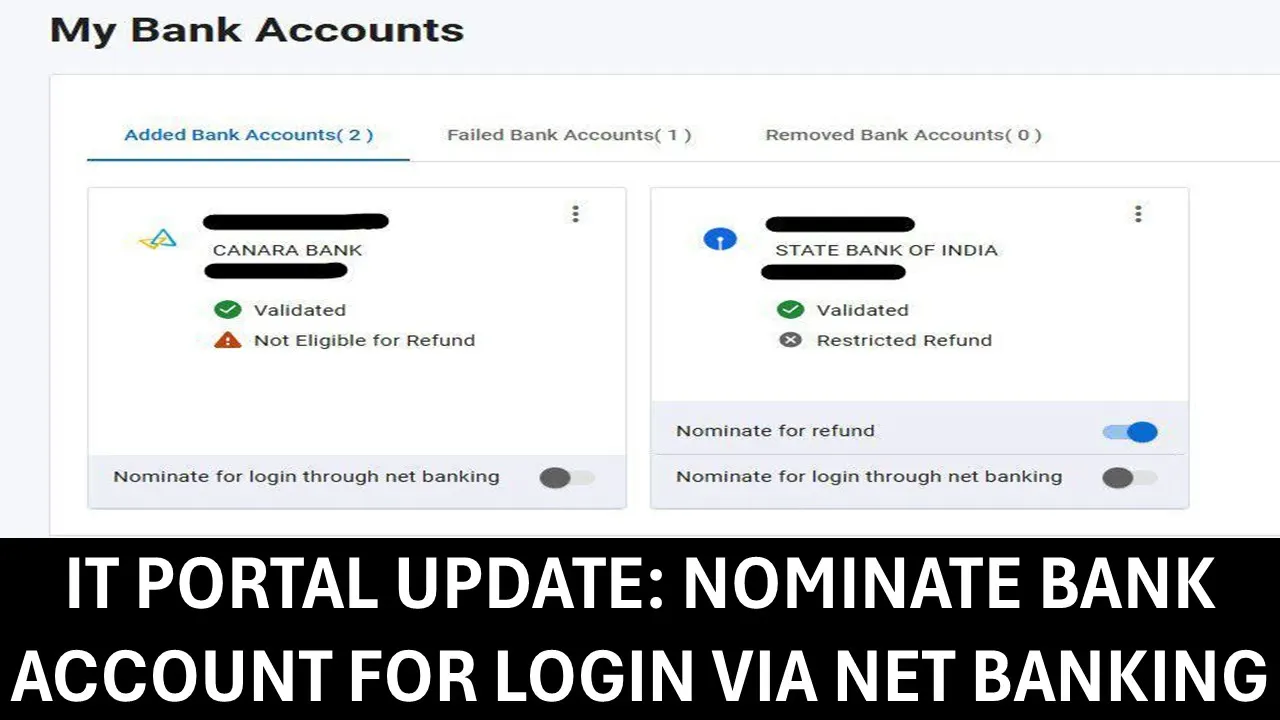
Learn how to securely log in to the Income Tax portal using your nominated bank account through net banking without needing a username or password.
New Feature: Nominate Bank Account for Login via Net Banking
 Saloni Kumari
 May 30, 2025
Income Tax Portal Update: Know More
The Income Tax portal now provides a new option under Bank Details to Nominate a Bank Account for Login through Net Banking.
When you choose a bank account for login, you are giving permission to that bank (which should be linked to your PAN and on the approved bank list) to let you access the Income Tax website using your bank’s online banking service.
Using this way, instead of typing a username and password on the Income Tax site, you can log in safely and easily through your bank’s website.
How Does It Work?
You can choose (or nominate) one of your bank accounts to log in to the Income Tax portal. But there are two important things about the bank account you select:
- The bank must be linked to your PAN (Permanent Account Number).
- The bank should be on the list of approved banks that support this login method.
About Author


Saloni Kumari
Content Writer
Saloni is a Content Writer with 2+ years of experience at studycafe.in. She writes legal, taxation, and finance related content including GST, Income Tax etc. Skilled in translating complex judicial pronouncements and regulatory developments into clear, and reader-friendly articles. Experienced in covering judgements of ITAT, High Court, GSTAT, and news related to Income Tax, GST, and corporate law. She can be reached at [email protected].
Saloni is a Content Writer with 2+ years of experience at studycafe.in. She writes legal, taxation, and finance related content including GST, Income Tax etc. Skilled in translating complex judicial pronouncements and regulatory developments into clear, and reader-friendly articles. Experienced in covering judgements of ITAT, High Court, GSTAT, and news related to Income Tax, GST, and corporate law. She can be reached at [email protected].
 StudyCafe
 Delhi, Delhi, India
 3023
3023My Recent Articles
- ED Apprehends Four Accused in Rs 261 Crore US Call Centre Fraud under PMLA, All Remanded to Judicial Custody
- How Are Diwali Gifts Taxed in 2026? Know the Income Tax, TDS and GST Rules
- ED Raids Ragam Theatre in Kerala’s Rs 300 Crore Bharat Lajna Co-operative Society Fraud Case
- CBI: Wanted in Delhi Sexual Assault Case, Accused Sajeer Palli Mooppam Extradited from UAE
- Max Healthcare Receives NCLT Order in Kalinga Hospital Dispute, Next Hearing Fixed for December 14
Up Next
Loading suggestions…


Recent Posts


All Posts

Tags
No tags yet.
Recent Posts
All Posts
Tags
No tags yet.