Company Affirmation of Readiness towards COVID-19: Guidelines to fill CAR
Company Affirmation of Readiness towards COVID-19: Guidelines to fill CAR: Step by step Guidelines to fill CAR Companies are required to fil
 Pratibha Goyal
 Mar 23, 2020
Company Affirmation of Readiness towards COVID-19: Guidelines to fill CAR: Step by step Guidelines to fill CAR
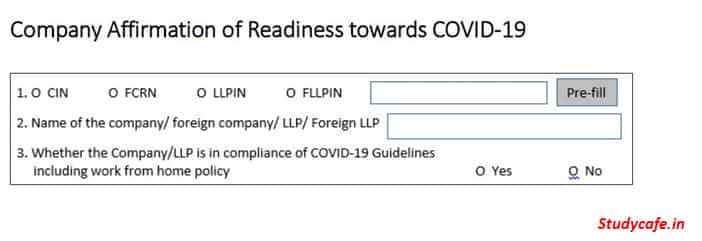
Companies are required to fill a form, CAR affirming rediness towards COVID-19. The Form will be deployed on MCA portal on 23.03.2020. The guidelines to fill the form and features of form CAR are given via this article:
Features of Form CAR:
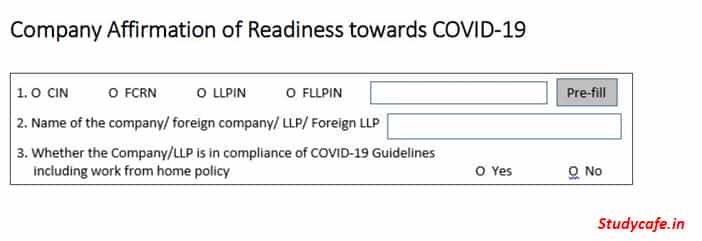 Company Affirmation of Readiness towards COVID-19: Guidelines to fill CAR[/caption]
Step 5: Select whether the Authorized Signatory of the Company/LLP who is providing the affirmation has a valid DIN/ PAN or Membership Number.
Note: Ensure that such authorized signatory is currently associated with the company/LLP.
Step 6: Enter valid DIN in case of Director/ PAN in case of other Key Managerial Personnel/ Membership Number in case of Company Secretary in full time employment.
[caption id="attachment_87415" align="aligncenter" width="697"]
Company Affirmation of Readiness towards COVID-19: Guidelines to fill CAR[/caption]
Step 5: Select whether the Authorized Signatory of the Company/LLP who is providing the affirmation has a valid DIN/ PAN or Membership Number.
Note: Ensure that such authorized signatory is currently associated with the company/LLP.
Step 6: Enter valid DIN in case of Director/ PAN in case of other Key Managerial Personnel/ Membership Number in case of Company Secretary in full time employment.
[caption id="attachment_87415" align="aligncenter" width="697"]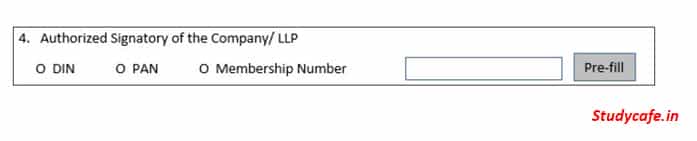 Step by step Guidelines to fill CAR[/caption]
Step 7: Click on Pre-fill
Step 8: In case DIN of a Director is entered, mobile number available in database shall be Pre-filled.
Note: Where mobile number is not Pre-filled, the field shall be editable and mobile number can be entered by the user.
Step 9: Click on ‘Send OTP’ button. OTP shall be sent to the mobile number entered.
Step 10: Enter OTP received on the mobile number and click on ‘Verify OTP’ button
[caption id="attachment_87416" align="aligncenter" width="698"]
Step by step Guidelines to fill CAR[/caption]
Step 7: Click on Pre-fill
Step 8: In case DIN of a Director is entered, mobile number available in database shall be Pre-filled.
Note: Where mobile number is not Pre-filled, the field shall be editable and mobile number can be entered by the user.
Step 9: Click on ‘Send OTP’ button. OTP shall be sent to the mobile number entered.
Step 10: Enter OTP received on the mobile number and click on ‘Verify OTP’ button
[caption id="attachment_87416" align="aligncenter" width="698"]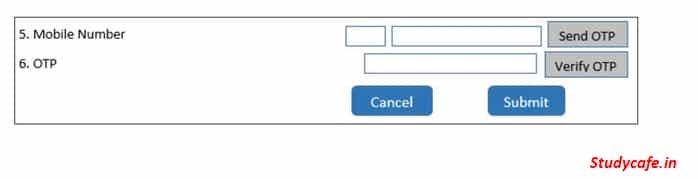 Features of Form CAR[/caption]
Step 11: Once OTP is verified, success message shall be displayed.
Step 12: Click on ‘Submit’ button to submit the form.
Note: Companies/LLPs are advised to use the service w.e.f 23rd March 2020 in a staggered manner to avoid the load on the system.
Features of Form CAR[/caption]
Step 11: Once OTP is verified, success message shall be displayed.
Step 12: Click on ‘Submit’ button to submit the form.
Note: Companies/LLPs are advised to use the service w.e.f 23rd March 2020 in a staggered manner to avoid the load on the system.
- It is a simple web form deployed on 23.03.2020 with minimum fields and can be filed from anywhere.
- No Fees is required to be paid while uploading the Form. Hence no SRN will be generated.
- DSC is not required for signing the Form. Only OTP verification is required
- This for is Available once you login at MCA Portal for both ‘Registered’ as well ‘Business User’
- All Indian companies/ Foreign companies/ LLPs/ Foreign LLPs are required to file the form
- Any one of the current Authorized Signatories of the Company/LLP can submit the form online
- System based acknowledgment shall be sent to:
- Email ID of the respective Company/Foreign Company/ LLP or Foreign LLP
- Email ID of the Authorized Signatory who is providing the affirmation
- Email ID of the FO user who is submitting the affirmation
Company Affirmation of Readiness towards COVID-19: Guidelines to fill CAR[/caption]
Step 5: Select whether the Authorized Signatory of the Company/LLP who is providing the affirmation has a valid DIN/ PAN or Membership Number.
Note: Ensure that such authorized signatory is currently associated with the company/LLP.
Step 6: Enter valid DIN in case of Director/ PAN in case of other Key Managerial Personnel/ Membership Number in case of Company Secretary in full time employment.
[caption id="attachment_87415" align="aligncenter" width="697"] Step by step Guidelines to fill CAR[/caption]
Step 7: Click on Pre-fill
Step 8: In case DIN of a Director is entered, mobile number available in database shall be Pre-filled.
Note: Where mobile number is not Pre-filled, the field shall be editable and mobile number can be entered by the user.
Step 9: Click on ‘Send OTP’ button. OTP shall be sent to the mobile number entered.
Step 10: Enter OTP received on the mobile number and click on ‘Verify OTP’ button
[caption id="attachment_87416" align="aligncenter" width="698"] Features of Form CAR[/caption]
Step 11: Once OTP is verified, success message shall be displayed.
Step 12: Click on ‘Submit’ button to submit the form.
Note: Companies/LLPs are advised to use the service w.e.f 23rd March 2020 in a staggered manner to avoid the load on the system.About Author


Pratibha Goyal
Admin
This Account belongs to Admistrator of Studycafe.
This Account belongs to Admistrator of Studycafe.
 Studycafe
 Delhi, Delhi, India
 1080
1080My Recent Articles
- Chartered Accountants Association Embraces Income Tax Faceless Proceedings
- CBDT condones delay in filing form 10IC for AY 20-21: Know upto when to file the form to take concessional tax benefit
- ICAI Announced date of Live Coaching Classes for CA Intermediate Nov 2022 Exam
- ICAI Announced Registration Date for Online Home-Based Practical Training Assessment
- ICAI Released Mock Test Papers Series for May 2022 CA Exam
Up Next
Loading suggestions…


Recent Posts



All Posts



Recent Posts
All Posts