How To Check Income Tax Refund Status Online
How To Check Income Tax Refund Status Online Income tax refund is the amount which the income tax department has to pay to the taxpayer. Thi
 Tista
Tista Sep 4, 2019
How To Check Income Tax Refund Status Online
Income tax refund is the amount which the income tax department has to pay to the taxpayer. This may be due to various reasons like, deduction of TDS but the tax on total income, when calculated is not payable, or may be due to excess payment of advance tax, or on account of any other reason. A person can claim the refund by filing his income tax return, which proves that the tax is refundable. Now the question arises that, how can one check the status of refund The answer to this question has been described in these simple steps:-
Through Income tax E-filing website :-
Step 1 : Login to the incometaxindiaefiling.gov.in website, by entering your PAN in the field provided for user id, password and the captcha code.
Step 2 : Go to View Returns/Forms section.
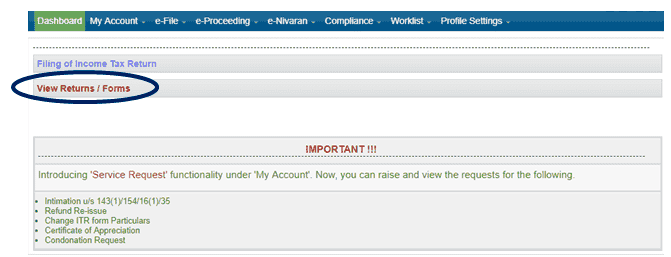 Step 3 : Select income tax returns against select an option and select the assessment year for which you want to check the refund status and click on submit.
Step 4 : Click on the acknowledgement number. (Acknowledgement number is a hyperlink).
Step 3 : Select income tax returns against select an option and select the assessment year for which you want to check the refund status and click on submit.
Step 4 : Click on the acknowledgement number. (Acknowledgement number is a hyperlink).
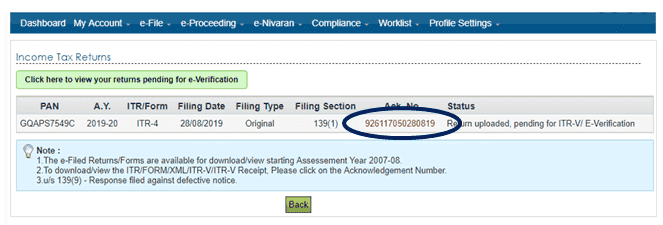 Following details will be displayed :-
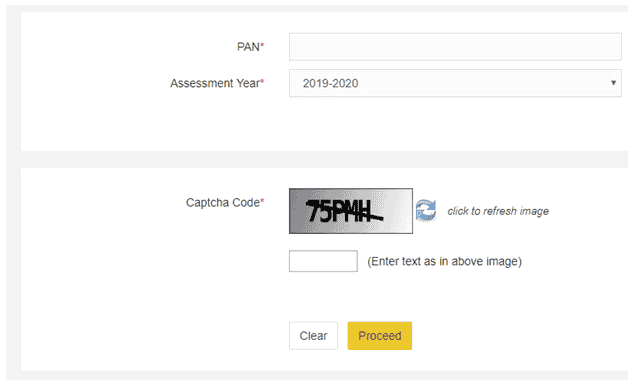 Step 3 : Click on Proceed button. You will get the status of your income tax refund.
Step 3 : Select income tax returns against select an option and select the assessment year for which you want to check the refund status and click on submit.
Step 4 : Click on the acknowledgement number. (Acknowledgement number is a hyperlink).
Following details will be displayed :-
- Assessment Year
- Status
- Reason (For Refund Failure if any)
- Mode of Payment
Step 3 : Click on Proceed button. You will get the status of your income tax refund.About Author


Tista
Student
 Delhi, Delhi, India
 39
39My Recent Articles
- Cancellation and Revocation of Cancellation of GST Registration
- Expectations from Budget 2020
- Deduction in respect of interest on loan taken for affordable housing Section 80EEA
- Carry forward and Set-off of Losses in case of Start-ups
- TDS PROVISIONS UNDER GST, TDS RATE IN GST, PERSONS NOTIFIED TO DEDUCT TDS
Up Next
Loading suggestions…


Recent Posts


All Posts



Tags
No tags yet.
Recent Posts
All Posts
Tags
No tags yet.