How to use the Offline Tool planned under New GST Return
How to use the Offline Tool planned under New GST Return What are the Offline Tools planned under New Return In the proposed system of new G
 Pratibha Goyal
 Jul 31, 2019
How to use the Offline Tool planned under New GST Return
What are the Offline Tools planned under New Return
In the proposed system of new GST Return filing, a normal taxpayer would have to file FORM GST RET-1 (Normal) or FORM GST RET-2 (Sahaj) or FORM GST RET-3 (Sugam) on either monthly or quarterly basis. Annexure of supplies (GST ANX-1) and Annexure of Inward Supplies (GST ANX-2) will be filed as part of these returns. All the outward supplies will be detailed in GST ANX-1 while GST ANX-2 will contain details of inward supplies auto-populated mainly from the suppliers GST ANX-1. It will also contain details auto-populated from Form GSTR-5 and Form GSTR-6.

The taxpayer will be required to take action on details of inward supplies contained in Form GST ANX-2 by accepting or rejecting the entries. The taxpayer can also keep the documents pending by marking the entry accordingly.
What is the purpose of trial
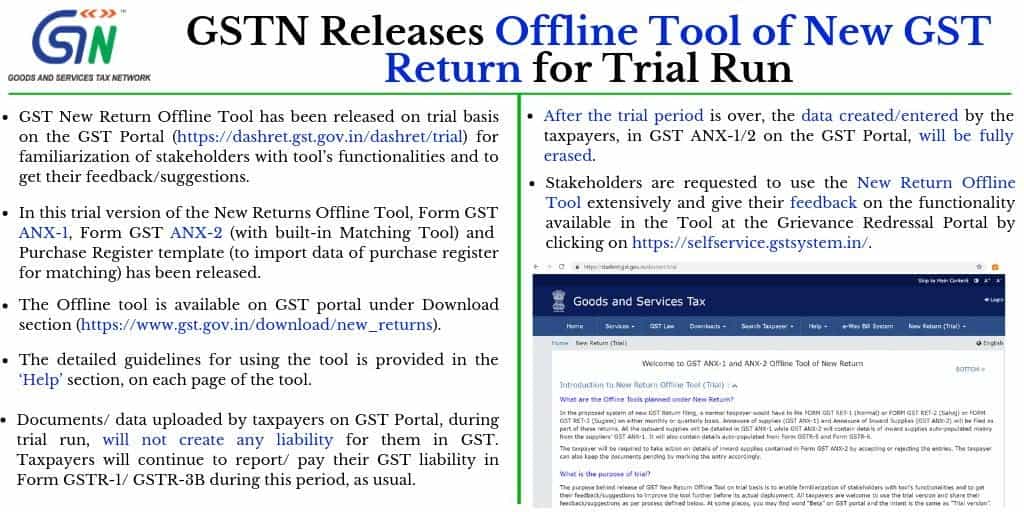
The purpose behind release of GST New Return Offline Tool on trial basis is to enable familiarization of stakeholders with tools functionalities and to get their feedback/suggestions to improve the tool further before its actual deployment. All taxpayers are welcome to use the trial version and share their feedback/suggestions as per process defined below. At some places, you may find word Beta on GST portal and the intent is the same as Trial version.

Where to get the New Return Offline Tool
GSTN has released trial version of the New Returns Offline Tool of Form GST ANX-1, Form GST ANX-2 (with Matching Tool built in it) and a template for Purchase Register which will be used to import data of purchase register for matching. The Offline tool is available on GST portal underDownloadsection. The detailed guidelines for using the tool is provided in the Help section, on each page of the tool. Also, detailed User Manual and Help is also available on the GST Portal under Help section.Main Components of the Offline Tool
The New Return Offline Tool has following main components:
- Form GST ANX-1: for preparing outward supplies details by entering details for each document or by importing from an excel file. The template of excel sheet is also available along with the Tool.
- Form GST ANX-2: for preparing inward supplies details by taking action on the auto-drafted version.
- Matching Tool: for matching of data of GST ANX-2, downloaded from GST Portal with Purchase register.
What is made available in Trial version of the Tool Facility made available in this release of the Offline Tool (ver 1.0)
- Preparation of GST ANX-1 by using the tool to directly fill up data (details of invoices etc.) in it.
- Preparation of GST ANX-1 by using Excel/csv template provided with the tool and importing the same into the Tool using GST ANX-1 functionality.
- Creation of JSON File of GST ANX-1 using the Tool and uploading it on GST Portal, after logging into the Portal. This data will be auto-populated in the GST ANX-2 of the recipient taxpayers.
- Downloading the auto-drafted ANX-2 from the dashboard at GST Portal and opening the same in the Offline Tool.
- Importing the Purchase Register in the Offline Tool for matching with ANX-2 downloaded from the GST Portal. Taxpayers will have to use Excel/csv template provided with the tool to prepare their Purchase Register and import the same in this Offline Tool.
- Comparing the auto populated GST ANX 2, downloaded from the Portal and the Purchase Register using the Matching Tool provided in the tool to identify documents which are fully matched, partially matched or not matched.
- Taking actions of Accept, Reject or Pending on ANX-2 downloaded and matched with Purchase register.
- Creating JSON file of final ANX-2 and uploading the same on GST Portal.
Facility NOT made available in this release of Trial Version
- Data contained in the ANX-2 uploaded by recipient taxpayer will not be flowing to supplier taxpayer (for editing/amending in case of rejected invoices) during trial period.
- HSN code validation is not available in the Offline tool in this version. However, HSN codes contained in ANX-1 and ANX-2 will be validated on uploading the json file on GST Portal. Documents containing incorrect HSN Codes will be rejected and errored out. Taxpayers are thus advised to enter correct HSN Codes in the offline tool (wherever required), to avoid rejection of the data later on during validation at the GST Portal (after upload).
- Online version of ANX-1 and ANX-2 is not available on the GST Portal at this stage but will be made available soon.
- On import of excel/CSV in offline tool to prepare ANX-1, the error file containing erroneous records will not be generated. The facility will be made available soon in the next version.
- The facility to delete records in ANX-1, uploaded earlier on GST Portal by using Mark for Delete feature in offline tool, will be made available in the next version.
- The facility to view summary of ANX-2 uploaded on GST Portal will be made available soon. Meanwhile taxpayers may view the summary by downloading the JSON and opening same in offline tool.
- On upload of ANX-2 JSON file prepared using offline tool on GST portal, the error file containing erroneous records will be generated, however, same cannot be opened in offline tool. The facility will be made available in next version.
- Facility to Refine Matching Result using tolerance and approximation will be made available in next version.
Will Participation in Trial Run/ Beta version of the Tool create any liability on GST Portal
NO Liability creation on account of data uploaded through ANX-1 during Trial Run:It may be noted that during trial run, documents/ data uploaded by taxpayers on GST Portal, will not create any liability for them in GST. This data will be separate and visible only to taxpayers and their respective buyers (to whom uploaded data pertains). Taxpayers will continue to report/ pay their GST liability in Form GSTR-1/ GSTR-3B during this period, as is being done by them now.
What happens to data created during Trial Run/ Beta version of the Tool
After the trial period is over, the data created/entered by the taxpayers, in GST ANX-1/2 on the GST Portal, will be fully erased. No part of the data uploaded by taxpayers as part of trial will be retained on the portal after implementation of the New Returns on the GST Portal.
How to use the Offline Tool
- Download the tool from Downloads section of GST Portal.
- Install the tool on your machine and create a profile in it by entering your GSTIN and other details. Multiple profiles can be created in the tool so that one tool can be used for preparing and retaining data of multiple taxpayers.
- Prepare outward and certain inward supplies (ex reverse charge) data in Form GST ANX-1 directly by inputting data or by importing the same from an Excel sheet as per template available along with the Tool.
- Log on the GST portal using your current User ID and Password. Go to Return under Services and select New Return Beta tab.
- Select period and Upload/Download of JSON file option on the dashboard and upload the JSON file created by the Tool based on supply data entered by you. This data will appear in the Form GST ANX-2 of the respective recipient taxpayers.
- As recipient taxpayer, you can download ANX-2 drafted by GST System using data of your suppliers participating in the trial. Ask, your suppliers to participate in the trial and upload your supply data.
- Create ANX-2 data by clicking on relevant tabs on the dashboard. The System may take some time to prepare your ANX-2 as it has compute the same in real time as any of your suppliers may upload data in his ANX-1.
- Download ANX-2 from the portal and open the same in the Offline Tool to take actions of Accept, Reject or Pending.
- In case, you have only few number of documents (invoices/Credit Note/Debit Note etc.), then you can take action of accept/reject etc. without running the matching tool. In case, you have more invoices, you may first import your purchase register in the Offline Tool and then run the Matching Tool.
- Matching Tool will show invoices/documents fully matched, partially matched or not matched.
- After matching, take action as appropriate by clicking on Accept, Reject or Pending tabs against each row. In case of partially matched or unmatched invoices/CN/DN, data as per ANX-2 and that as per your purchase register will be shown in two consecutive rows, having different background and component not matching in red colour.
- After completing the accept/reject/ pending exercise, create JSON file using the Offline Tool and then upload the same on GST Portal.
- You may use the tool to enter data from the month of July, 2019 onwards during the trial period. Using real life data will enable you to see various permutation-combination of scenarios. You are encouraged to do so to find any scenario where tool does not work as per design.
Note:
- The tax period in offline tool shall be selected as July, 2019 and onwards.
- HSN, if applicable shall be entered only in either 4, 6 or 8 digit in ANX-1 excel import template and offline tool.
About Author


Pratibha Goyal
Admin
 Studycafe
 Delhi, Delhi, India
 1080
1080My Recent Articles
- Chartered Accountants Association Embraces Income Tax Faceless Proceedings
- CBDT condones delay in filing form 10IC for AY 20-21: Know upto when to file the form to take concessional tax benefit
- ICAI Announced date of Live Coaching Classes for CA Intermediate Nov 2022 Exam
- ICAI Announced Registration Date for Online Home-Based Practical Training Assessment
- ICAI Released Mock Test Papers Series for May 2022 CA Exam
Loading suggestions…


Recent Posts


All Posts



Tags
Recent Posts
All Posts