Brief steps for Online TDS/TCS/Demand Payment
Brief steps for Online TDS/TCS/Demand Payment Challan No. ITNS 281 is used by the Deductors to deposit Tax Deducted at source/Tax Collected
 CA Deepak Gupta
 May 19, 2019
Brief steps for Online TDS/TCS/Demand Payment
Challan No. ITNS 281 is used by the Deductors to deposit Tax Deducted at source/Tax Collected Source (TDS/TCS) and Demand Payment.
User should have Internet Banking Account in order to avail facility of Online payment of Challans.
Following details required to be filled while payment of Challan ITNS-281:
1. Tax Applicable:-This column has two options:
0020: This is applicable in the case of income tax of companies ( If Deductee is company).
0021: This is applicable to income tax for other than companies (If Deductee is not a company i.e. an individual, HUF, partnership firm, etc.).
2. Assessment Year.
3. TAN No., Name and Address
4. Type of Payment:
200 ( TDS/TCS payable by Taxpayer)
400 ( TDS/TCS payable regular Assessment).
Note : In case of Online Demand Payment Deductor can select Minor Head 400 ( TDS/TCS Regular Assessment ). For TDS/TCS payment Deductor can select Minor Head 200 ( TDS/TCS payable by Taxpayer).
5. Nature of Payment: Deductor has to select Section Code as per the section under which TDS/TCS is deducted
Go to www.tin nsdl .com website .
Step 1: Click on e- payment Pay Taxes Online available at home page under Services tab.
Step 2: Select Challan ITNS 281 for Demand payment from the list. Challan ITNS-281 Form will appear.
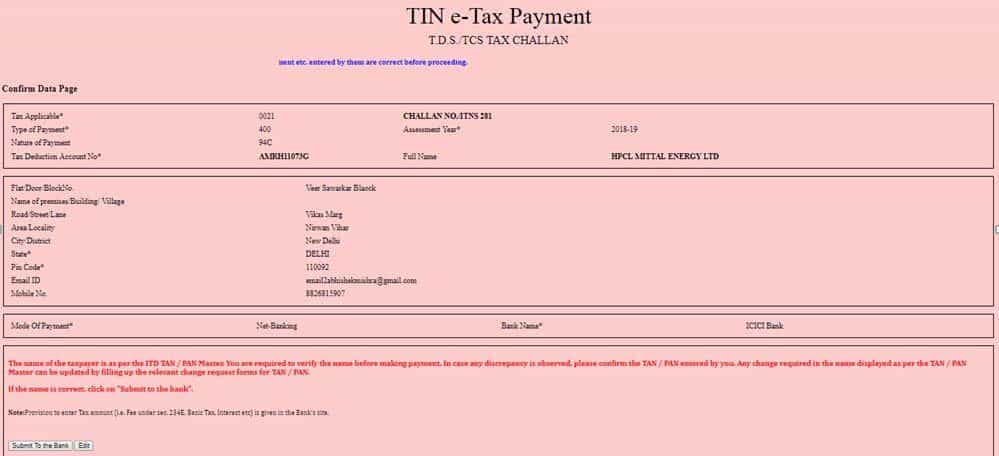
Step 3: Select Major Head (0020/0021), Enter valid 10-digit Tax Deduction and Collection Account Number (TAN), Assessment Year, Address. Minor Head/Type of Payment (200/400), Nature of payment, Mode of Payment & Bank Name then Click on Proceed button.
Step 4: Confirmation Screen will appear to confirm the details entered in Challan . On Confirming the details entered in Challan. Click on Submit to Bank button.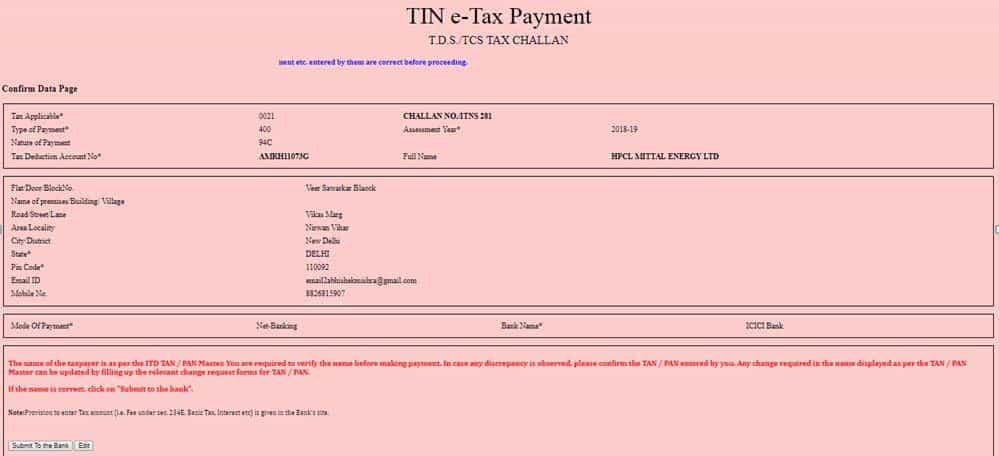 Step 5: Deductor will be re-directed to the Internet- Banking site of the bank. Enter the User- ID and Password provided by the bank.
Step 6: Enter payment details at Bank website and make the TDS payment.
Note: On Successful payment , A Challan counterfoil will be generated containing Challan Identification Number (CIN), payment details and Bank Name through which e- Payment has been made. This counterfoil is proof of payment being made
Step 5: Deductor will be re-directed to the Internet- Banking site of the bank. Enter the User- ID and Password provided by the bank.
Step 6: Enter payment details at Bank website and make the TDS payment.
Note: On Successful payment , A Challan counterfoil will be generated containing Challan Identification Number (CIN), payment details and Bank Name through which e- Payment has been made. This counterfoil is proof of payment being made
Step 5: Deductor will be re-directed to the Internet- Banking site of the bank. Enter the User- ID and Password provided by the bank.
Step 6: Enter payment details at Bank website and make the TDS payment.
Note: On Successful payment , A Challan counterfoil will be generated containing Challan Identification Number (CIN), payment details and Bank Name through which e- Payment has been made. This counterfoil is proof of payment being madeAbout Author


CA Deepak Gupta
Co Founder
CA Deepak Gupta,is Co-founder of Studycafe. He is Microsoft Office Specialist and Corporate Trainer of AI Tools, Microsoft Excel.
He is Finance Influencer having more than 250K followers on Social Media. CA Deepak Gupta, is Having more than 14 plus years of experience, and he has Worked with best brands Like, Hero, Wipro, Ericsson before Starting Studycafe. He has Trained more than 20000 Persons in Microsoft Excel, PowerPoint, Power BI, Google Sheet, Google Forms and Other Tools.
CA Deepak Gupta,is Co-founder of Studycafe. He is Microsoft Office Specialist and Corporate Trainer of AI Tools, Microsoft Excel.
He is Finance Influencer having more than 250K followers on Social Media. CA Deepak Gupta, is Having more than 14 plus years of experience, and he has Worked with best brands Like, Hero, Wipro, Ericsson before Starting Studycafe. He has Trained more than 20000 Persons in Microsoft Excel, PowerPoint, Power BI, Google Sheet, Google Forms and Other Tools.
 StudyCafe
 Delhi, Delhi, India
 3423
3423My Recent Articles
- UltraTech Cement slapped with Rs. 808.78 Cr Income Tax Demand
- GST: High Court upheld constitutional validity of Section 16(2)(c), asks government to address ITC issues of genuine purchasers
- Old vs New Tax Regime for Tax Year 2026-27
- High court criticizes Income Tax Department for not releasing ITR Utilities despite 11 years of directions
- Fino Payments Bank CEO Rishi Gupta Gets Bail in GST Case, Bank Clarifies No Direct Link
Up Next
Loading suggestions…


Recent Posts

All Posts

Tags
No tags yet.
Recent Posts
All Posts
Tags
No tags yet.