GST portal enabled new window for claiming TDS/TCS credits
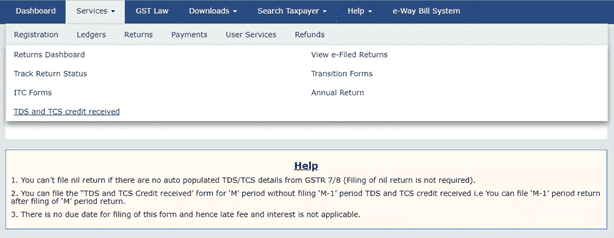
GST portal enabled new window for claiming TDS/TCS credits Prepare Online:- Auto populated details are less than or equal to 500 records per
 CA Deepak Gupta
 May 19, 2019
GST portal enabled new window for claiming TDS/TCS credits
Prepare Online:-
Auto populated details are less than or equal to 500 records per table may make use of this facility.

Steps to be taken:
- Click on 'Prepare Online'; - Take the action on auto populated details from GSTR 7 and GSTR 8; and - Click on Proceed to File and File TDS and TCS Credit received form.Prepare Offline:-
If Auto populated details are more than 500 records per table (TDS credit received, Amendments to TDS Credit received, TCS Credit received, Amendments to TCS credit received) can prepare their return by using the offline utility and subsequently upload on GST Common Portal.

You can download the TDS and TCS Credit received offline tool from the Downloads section in the pre-login page on the portal. You should have downloaded the Offline Tool and installed it on your computer.
- Click on Prepare Offline; - Click on Download to download auto-drafted details from GSTR 7 and GSTR 8 details, if any; - Take action (Accept/Reject) on auto populated details in Action field and generate JSON file for upload; and - Click on Upload to upload JSON file and file the return with help of instruction available on TDS and TCS credit received dashboard.Offline utility can also be used for filing TDS and TCS Credit received form if number of records are up to 500.
About Author


CA Deepak Gupta
Co Founder
 StudyCafe
 Delhi, Delhi, India
 3423
3423My Recent Articles
- UltraTech Cement slapped with Rs. 808.78 Cr Income Tax Demand
- GST: High Court upheld constitutional validity of Section 16(2)(c), asks government to address ITC issues of genuine purchasers
- Old vs New Tax Regime for Tax Year 2026-27
- High court criticizes Income Tax Department for not releasing ITR Utilities despite 11 years of directions
- Fino Payments Bank CEO Rishi Gupta Gets Bail in GST Case, Bank Clarifies No Direct Link
Loading suggestions…


Recent Posts



All Posts


Recent Posts
All Posts