GST RFD-01A- On account of Refund by Supplier of deemed export
GST RFD-01A- On account of Refund by Supplier of deemed export : The GSTN has introduced the new RFD-01A form for Refund by Supplier of deem
 CA Deepak Gupta
 Oct 7, 2018
Table of Contents

GST RFD-01A- On account of Refund by Supplier of deemed export:The GSTN has introduced the new RFD-01A form for Refund by Supplier of deemed export. In these article we will see the detailed analysis related to the Refund form, Rules and how to file the nil and not a nil refund form online.
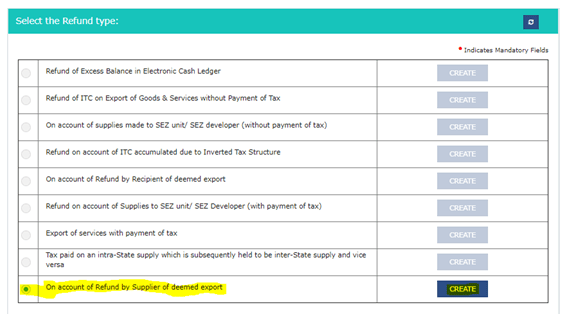 B. After clicking on create tab following screen is visible:
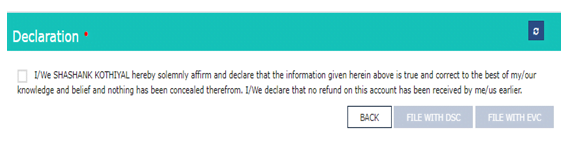 D. Click on the check box and file the Nil Refund form with DSC or EVC.
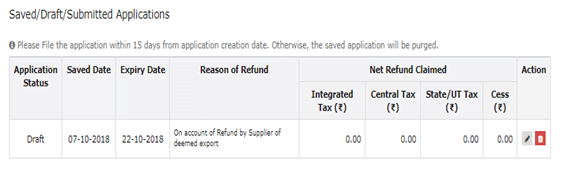
E. After successful filing of Nil Refund Form, the filed refund application can be viewed in Saved/Filed Applications tab:
D. Click on the check box and file the Nil Refund form with DSC or EVC.
E. After successful filing of Nil Refund Form, the filed refund application can be viewed in Saved/Filed Applications tab:
 II. In case of Not a Nil Refund Form
A. Login > Services > Refund > Application for refund type, then click on create tab and select the refund period month or quarter.
II. In case of Not a Nil Refund Form
A. Login > Services > Refund > Application for refund type, then click on create tab and select the refund period month or quarter.
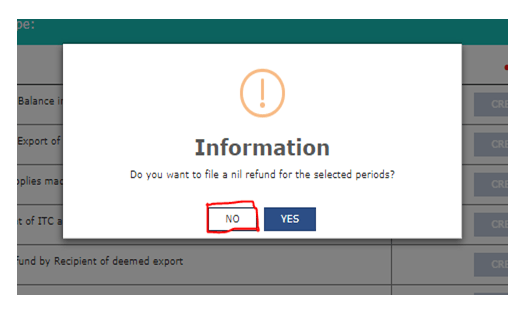
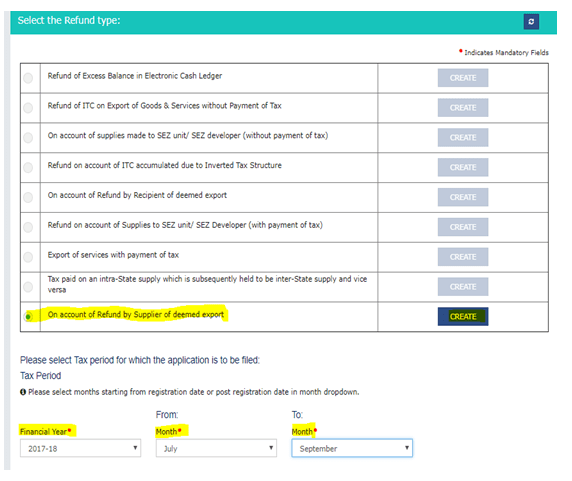 B. Click on create tab, then selecting No the following screen is visible.
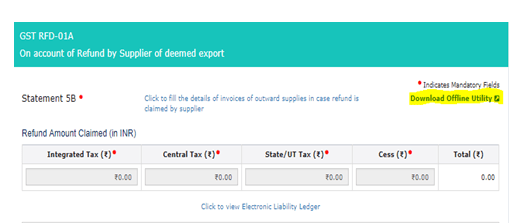
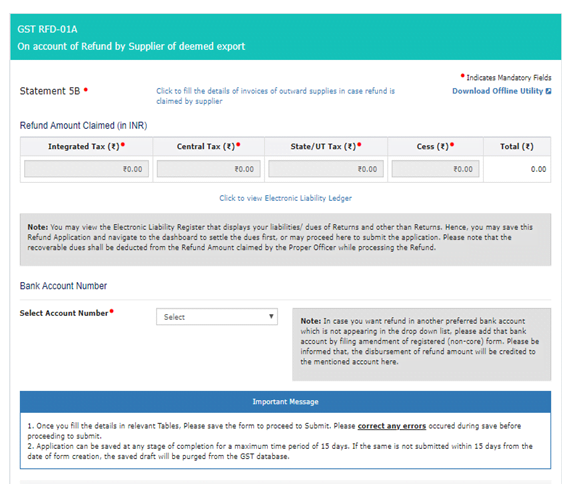 C. Then download the offline utility of Statement-5B.
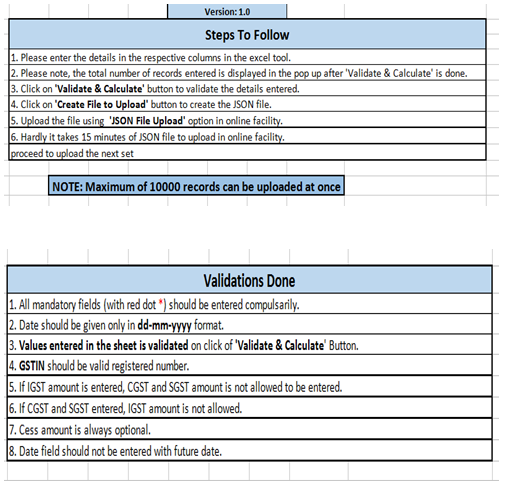
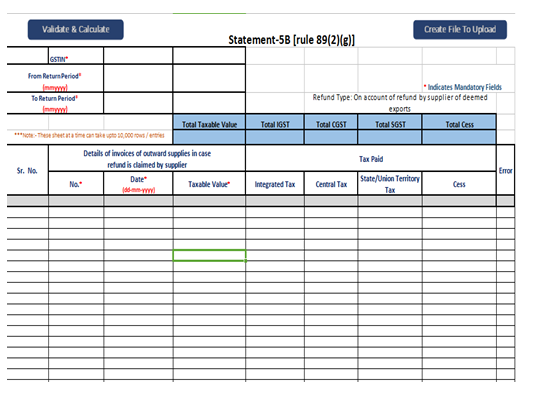 Then fill the mandatory field in excel utility like:
I. GSTIN.
II. From Return Period & To Return Period.
III. "Details of invoices of outward supplies in case refund is claimed by supplier":
Then fill the mandatory field in excel utility like:
I. GSTIN.
II. From Return Period & To Return Period.
III. "Details of invoices of outward supplies in case refund is claimed by supplier":
 V. Then click on validate sheet, if any error comes will show in error column.
VI. After successful validation, click on create file to upload to create the .json file.
VII. Save the JSON file.
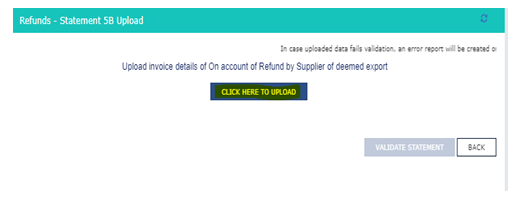
D. Click on Click to fill the details of invoices of outward supplies in case refund is claimed by supplier then the following screen is visible, after that click on Click here to Upload to upload the json file.
V. Then click on validate sheet, if any error comes will show in error column.
VI. After successful validation, click on create file to upload to create the .json file.
VII. Save the JSON file.
D. Click on Click to fill the details of invoices of outward supplies in case refund is claimed by supplier then the following screen is visible, after that click on Click here to Upload to upload the json file.
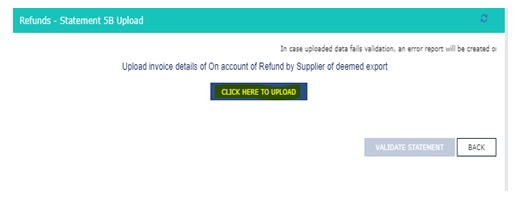 E. After successful uploading then click on Validate Statement to validate the sheet.
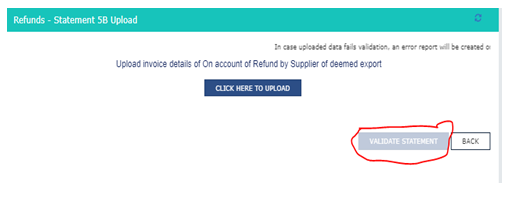 F. After successful validation of sheet, fill the amount in Refund Amount Claimed (in INR) under applicable head.
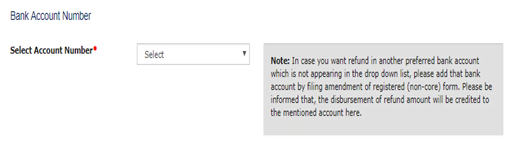
 G. After entering the amount then select the Bank Account No to get the refund.
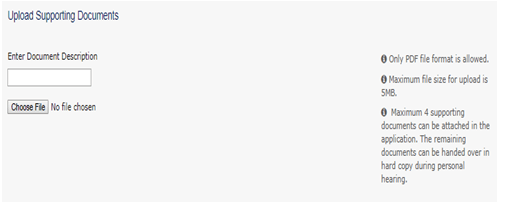
 H. Then upload the documents, if any as per Rule 89(2) of CGST Rules,2017.
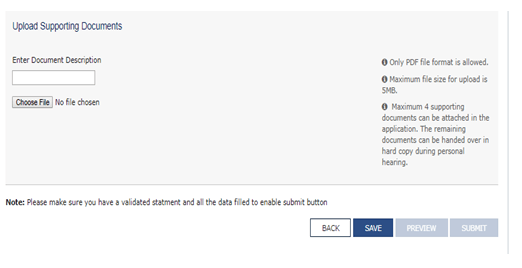 J. After click on save button, if statement is validated and all the data filed then submit button is enabled.
K. Click on Preview button.
L. After preview click on Submit button, the file the Refund form with DSC or EVC.
J. After click on save button, if statement is validated and all the data filed then submit button is enabled.
K. Click on Preview button.
L. After preview click on Submit button, the file the Refund form with DSC or EVC.
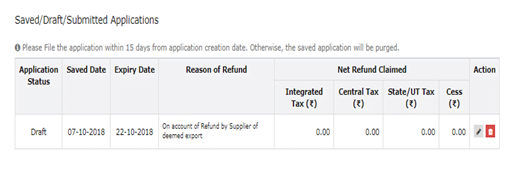
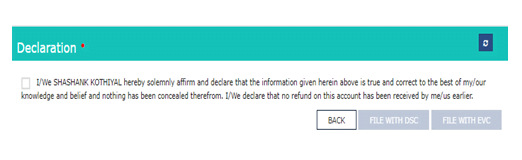 M. After successful filing of Refund Form, the filed refund application can be viewed in Saved/Filed Applications tab:
This article has been written byCS Shashank Kothiyal.
- Who can file a refund application in case of Deemed Exports supplies:
GST RFD-01A- On account of Refund by Supplier of deemed export
Now we will see the online procedure to file the application through the portal. I. In case of Nil Refund Form A. Login > Services > Refund > Application for refund type, then click on create tab and select the refund period month or quarter.
B. After clicking on create tab following screen is visible:
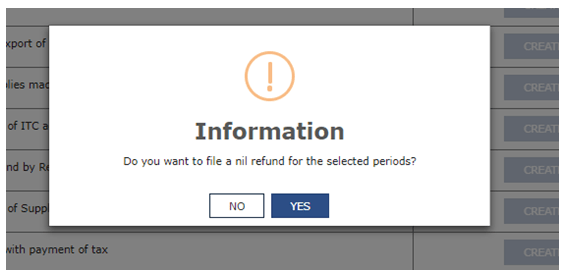
D. Click on the check box and file the Nil Refund form with DSC or EVC.
E. After successful filing of Nil Refund Form, the filed refund application can be viewed in Saved/Filed Applications tab:
II. In case of Not a Nil Refund Form
A. Login > Services > Refund > Application for refund type, then click on create tab and select the refund period month or quarter.
B. Click on create tab, then selecting No the following screen is visible.
C. Then download the offline utility of Statement-5B.
Then fill the mandatory field in excel utility like:
I. GSTIN.
II. From Return Period & To Return Period.
III. "Details of invoices of outward supplies in case refund is claimed by supplier":
Invoice No. Date (DD-MM-YYYY) Format Taxable Value
IV. Tax PaidCGST SGST IGST CESS
E. After successful uploading then click on Validate Statement to validate the sheet.
F. After successful validation of sheet, fill the amount in Refund Amount Claimed (in INR) under applicable head.
G. After entering the amount then select the Bank Account No to get the refund.
H. Then upload the documents, if any as per Rule 89(2) of CGST Rules,2017.
Maximum 4 supporting documents can be attached. Maximum file size for upload is 5MB. If supporting documents is more than 4, then the remaining documents can be handed over in hard copy during personal hearing.
J. After click on save button, if statement is validated and all the data filed then submit button is enabled.
K. Click on Preview button.
L. After preview click on Submit button, the file the Refund form with DSC or EVC.
M. After successful filing of Refund Form, the filed refund application can be viewed in Saved/Filed Applications tab:
This article has been written byCS Shashank Kothiyal.
About Author


CA Deepak Gupta
Co Founder
CA Deepak Gupta,is Co-founder of Studycafe. He is Microsoft Office Specialist and Corporate Trainer of AI Tools, Microsoft Excel.
He is Finance Influencer having more than 250K followers on Social Media. CA Deepak Gupta, is Having more than 14 plus years of experience, and he has Worked with best brands Like, Hero, Wipro, Ericsson before Starting Studycafe. He has Trained more than 20000 Persons in Microsoft Excel, PowerPoint, Power BI, Google Sheet, Google Forms and Other Tools.
CA Deepak Gupta,is Co-founder of Studycafe. He is Microsoft Office Specialist and Corporate Trainer of AI Tools, Microsoft Excel.
He is Finance Influencer having more than 250K followers on Social Media. CA Deepak Gupta, is Having more than 14 plus years of experience, and he has Worked with best brands Like, Hero, Wipro, Ericsson before Starting Studycafe. He has Trained more than 20000 Persons in Microsoft Excel, PowerPoint, Power BI, Google Sheet, Google Forms and Other Tools.
 StudyCafe
 Delhi, Delhi, India
 3423
3423My Recent Articles
- UltraTech Cement slapped with Rs. 808.78 Cr Income Tax Demand
- GST: High Court upheld constitutional validity of Section 16(2)(c), asks government to address ITC issues of genuine purchasers
- Old vs New Tax Regime for Tax Year 2026-27
- High court criticizes Income Tax Department for not releasing ITR Utilities despite 11 years of directions
- Fino Payments Bank CEO Rishi Gupta Gets Bail in GST Case, Bank Clarifies No Direct Link
Up Next
Loading suggestions…


Recent Posts


All Posts


Tags
No tags yet.
Recent Posts
All Posts
Tags
No tags yet.