GSTN : Tips for Scanning Documents and Reducing File Size
Tips for Scanning Documents and Reducing File Size for uploading supporting documents with the refund application Taxpayers are expected to
 Reetu
Reetu Dec 2, 2019
Tips for Scanning Documents and Reducing File Size for uploading supporting documents with the refund application
Taxpayers are expected to upload the supporting documents while filing their refund application (Form GST RFD-01).The GST Common Portal allows taxpayers to upload 4 documents up to 5 MB each (total 20 MB).
What is a document
The document here does not mean one invoice or one credit/debit note but a set of invoices or credit/debit notes scanned together so that the size of scanned document containing them is less than or equal to 5 MB.
Is there a limit on number of invoices, credit/debit notes etc. in a scanned document
There is no limit to the number of invoices/credit notes etc. You can scan and upload, till size of the scanned document containing multiple pages is less than or equal to 5 MB.
How can multiple invoices/ debit/ credit notes be included in one document
Some scanners can scan multiple documents and convert the images into a single pdf document. Whereas some scanners allow only one scan at a time. For such scanners, the taxpayers can scan the invoices/ debit/ credit notes, insert them sequentially in one word document and save the word document in PDF format. It is advised that the size of the scanned invoices/ debit/ credit notes be kept low.
How to find size of your document
To find out the size of your scan/ document, right-click on the thumbnail of your scan in the Document Viewer and select "Properties." Look for the number beside "File Size." If your scan is too large (larger than 5MB), try one or more of the following to reduce the file size.
How to scan the document to a lower quality file type:
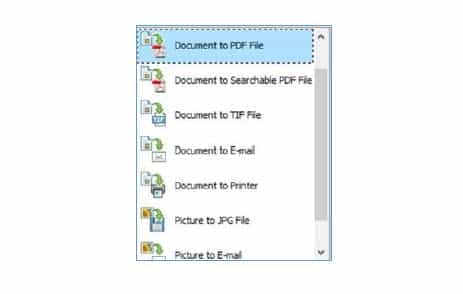
1. When the window "Scanning From The Scan Picture/Document/Film" opens, select your preferred File Type like jpeg, pdf, png, tiff etc. PDF files are small in size.
 How to scan the document at a lower resolution :
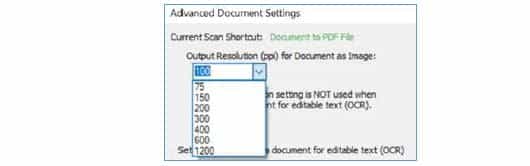
1. When the window "Scanning From the Scan Picture/Document/Film" opens, click "Scan Document Settings."
2. Adjust the number of the Resolution (dpi). We recommend a resolution of 100 dpi. Scanning in Line Art scan mode or Grayscale scan mode will also result in a lower resolution document.
3. Select “online publishing” option when saving as PDF since this will reduce the file size.
How to scan the document at a lower resolution :
1. When the window "Scanning From the Scan Picture/Document/Film" opens, click "Scan Document Settings."
2. Adjust the number of the Resolution (dpi). We recommend a resolution of 100 dpi. Scanning in Line Art scan mode or Grayscale scan mode will also result in a lower resolution document.
3. Select “online publishing” option when saving as PDF since this will reduce the file size.
 How to save the file as a PDF and reduce the file size
1. Open your scan (pdf)
2. Choose < "Advanced" > PDF Optimizer
3. Click on “OK” then name and save the file
4. The file size will automatically be reduced when saved
Please note, if the file size is already as small as possible, this command has no effect.
Can mobile based scanning apps be used for scanning the invoices/ debit/ credit notes.
Mobile phone based scanning apps like ‘Cam Scanner’ can also be used for scanning the invoices/ debit/ credit notes. The taxpayers can easily scan multiple invoices/ debit/ credit notes through such mobile applications and get the output in a consolidated PDF which can be uploaded with the refund application.
Notes :
1. If one uses 100 DPI in setting of scanner, an A-4 size paper can be scanned with 100 KB size and thus more than 50 A-4 documents can be scanned in one pdf document.
2. To facilitate scanning multi-page documents, we recommend using a scanner that can automatically scan multiple pages and save them as a single PDF file.
3. Order the supporting document by importance and relevance.
4. In case of any doubt, please call our Helpdesk which can guide you on how to scan and upload multiple documents.
Click Here to Buy CA Final Pendrive Classes at Discounted Rate
You May Also Like :
How to save the file as a PDF and reduce the file size
1. Open your scan (pdf)
2. Choose < "Advanced" > PDF Optimizer
3. Click on “OK” then name and save the file
4. The file size will automatically be reduced when saved
Please note, if the file size is already as small as possible, this command has no effect.
Can mobile based scanning apps be used for scanning the invoices/ debit/ credit notes.
Mobile phone based scanning apps like ‘Cam Scanner’ can also be used for scanning the invoices/ debit/ credit notes. The taxpayers can easily scan multiple invoices/ debit/ credit notes through such mobile applications and get the output in a consolidated PDF which can be uploaded with the refund application.
Notes :
1. If one uses 100 DPI in setting of scanner, an A-4 size paper can be scanned with 100 KB size and thus more than 50 A-4 documents can be scanned in one pdf document.
2. To facilitate scanning multi-page documents, we recommend using a scanner that can automatically scan multiple pages and save them as a single PDF file.
3. Order the supporting document by importance and relevance.
4. In case of any doubt, please call our Helpdesk which can guide you on how to scan and upload multiple documents.
Click Here to Buy CA Final Pendrive Classes at Discounted Rate
You May Also Like :
How to scan the document at a lower resolution :
1. When the window "Scanning From the Scan Picture/Document/Film" opens, click "Scan Document Settings."
2. Adjust the number of the Resolution (dpi). We recommend a resolution of 100 dpi. Scanning in Line Art scan mode or Grayscale scan mode will also result in a lower resolution document.
3. Select “online publishing” option when saving as PDF since this will reduce the file size.
How to save the file as a PDF and reduce the file size
1. Open your scan (pdf)
2. Choose < "Advanced" > PDF Optimizer
3. Click on “OK” then name and save the file
4. The file size will automatically be reduced when saved
Please note, if the file size is already as small as possible, this command has no effect.
Can mobile based scanning apps be used for scanning the invoices/ debit/ credit notes.
Mobile phone based scanning apps like ‘Cam Scanner’ can also be used for scanning the invoices/ debit/ credit notes. The taxpayers can easily scan multiple invoices/ debit/ credit notes through such mobile applications and get the output in a consolidated PDF which can be uploaded with the refund application.
Notes :
1. If one uses 100 DPI in setting of scanner, an A-4 size paper can be scanned with 100 KB size and thus more than 50 A-4 documents can be scanned in one pdf document.
2. To facilitate scanning multi-page documents, we recommend using a scanner that can automatically scan multiple pages and save them as a single PDF file.
3. Order the supporting document by importance and relevance.
4. In case of any doubt, please call our Helpdesk which can guide you on how to scan and upload multiple documents.
Click Here to Buy CA Final Pendrive Classes at Discounted Rate
You May Also Like :
Taxpayers should not wait till the last three days to file their returns: GSTN
About Author


Reetu
Content Manager
Reetu is a Content Writer with 4+ years of experience in GST, Income Tax, Finance, Company Law, Education and Career Related Content. She is a B.COM (Honrs.) Graduate.
Reetu is a Content Writer with 4+ years of experience in GST, Income Tax, Finance, Company Law, Education and Career Related Content. She is a B.COM (Honrs.) Graduate.
 Studycafe
 Delhi, Delhi, India
 8071
8071My Recent Articles
- Income Tax Guide for Indian Defence Personnel for Tax Filing, Taxable Allowances and Other Benefits
- Income Tax Return Breaking: ITR Forms released for AY 25-26
- Ex-DRT Officials Sentenced to 5 Years Rigorous Imprisonment by Madras High Court along with Rs.27 Lakh Fine
- GSTN issued Advisory on Case Sensitivity in IRN Generation
- RBI to issue Notes of Rs.10 and Rs.500 bearing Signature of Guv Malhotra
Up Next
Loading suggestions…


Recent Posts

All Posts



Tags
No tags yet.
Recent Posts
All Posts
Tags
No tags yet.