How to Apply for TAN Registration:
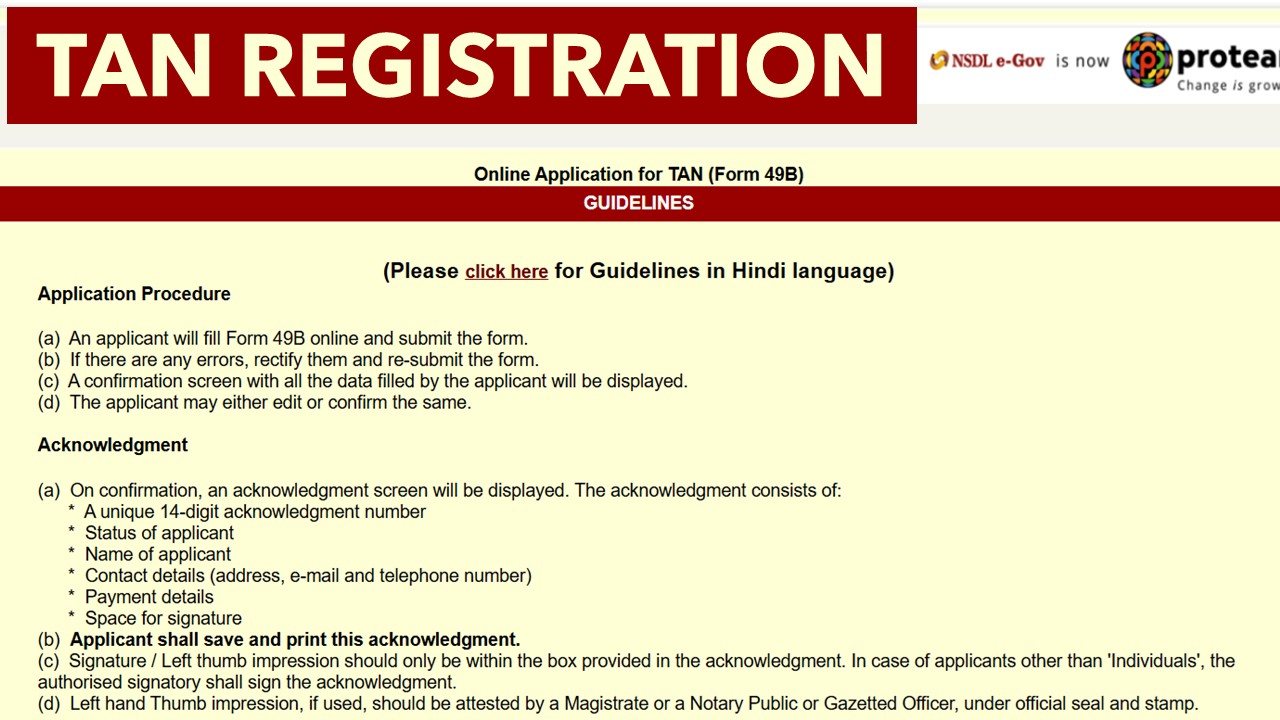
Know the process for TAN Registration TAN Registration Know the process for TAN Registration
TAN Registration
 CA Deepak Gupta
 Apr 5, 2019
How to Apply for TAN Registration:
Introduction
TAN (Tax deduction and collection account number) is a unique 10 digit alpha number which is issued by the Income tax return department of India. TAN registration is important to get a TAN number, and it is compulsory to quote TAN in TDS return. If you are responsible for collecting tax at source then you have to get your TAN number because without having a TAN number you cannot deduct income at source. Basically an employer cut their employee's salary as a TDS (tax deduction at source) which means advance tax. This article talks about TAN registration so you will get an idea about this.
What is TAN registration
If you are an employer and you are responsible for collecting tax at source then you have to register your TAN under Income tax department of India. It is required for making tax deduction or tax collection at source, remittance of TDS payments and issuance of TDS certificates. If you are running a company or firm then you have to get done your TAN registration. This registration can be done online.
Procedure of TAN registration
You can apply for TAN through both offline and online mode. In offline mode you have fill the form manually and have to attached the required documents and then have to send your form to the official departments whereas in online mode you have to visit the official website that is https://tin.tin.nsdl.com/tan/form49B.html then you have to fill the form online and have to submit the form. Here is online procedure in stepwise-
- You have to visit the official website of Income tax department of India where you find the option of TAN registration or you can direct click on this link https://tin.tin.nsdl.com/tan/form49B.html
- After clicking on above link a web page will open and you have to click on the Online Application for TAN (Form 49B). Form 49B is for TAN registration so you have to click on the form 49B. After clicking on 49B you will get guidelines so read carefully those guidelines it will help you.
- Then you have to select the category of deductors. There are different-different categories mentioned like company, government and others so you have to choose you own category.
- Then you have to fill the whole form, you have to fill the all required informations. After filling the whole form you can save your form and if you find any error then you can also change the detail in your form. After checking your form you can submit your form along with required documents and then you can pay the required fees.
- After successful submission you have to take print of your form and then you have to send your form to the NSDL office. Address of office is mentioned on the website so you can check there.
About Author


CA Deepak Gupta
Co Founder
CA Deepak Gupta,is Co-founder of Studycafe. He is Microsoft Office Specialist and Corporate Trainer of AI Tools, Microsoft Excel.
He is Finance Influencer having more than 250K followers on Social Media. CA Deepak Gupta, is Having more than 14 plus years of experience, and he has Worked with best brands Like, Hero, Wipro, Ericsson before Starting Studycafe. He has Trained more than 20000 Persons in Microsoft Excel, PowerPoint, Power BI, Google Sheet, Google Forms and Other Tools.
CA Deepak Gupta,is Co-founder of Studycafe. He is Microsoft Office Specialist and Corporate Trainer of AI Tools, Microsoft Excel.
He is Finance Influencer having more than 250K followers on Social Media. CA Deepak Gupta, is Having more than 14 plus years of experience, and he has Worked with best brands Like, Hero, Wipro, Ericsson before Starting Studycafe. He has Trained more than 20000 Persons in Microsoft Excel, PowerPoint, Power BI, Google Sheet, Google Forms and Other Tools.
 StudyCafe
 Delhi, Delhi, India
 3423
3423My Recent Articles
- UltraTech Cement slapped with Rs. 808.78 Cr Income Tax Demand
- GST: High Court upheld constitutional validity of Section 16(2)(c), asks government to address ITC issues of genuine purchasers
- Old vs New Tax Regime for Tax Year 2026-27
- High court criticizes Income Tax Department for not releasing ITR Utilities despite 11 years of directions
- Fino Payments Bank CEO Rishi Gupta Gets Bail in GST Case, Bank Clarifies No Direct Link
Up Next
Loading suggestions…


Recent Posts


All Posts

Tags
Recent Posts
All Posts