How to use offline Tool to prepare Form GSTR-4
How to use offline Tool to prepare Form GSTR-4 An EXCEL based offline tool has been provided on GST portal for composition taxpayers to prep
 Reetu
Reetu Aug 12, 2020
Steps to use the offline tool
[caption id="attachment_90616" align="aligncenter" width="823"]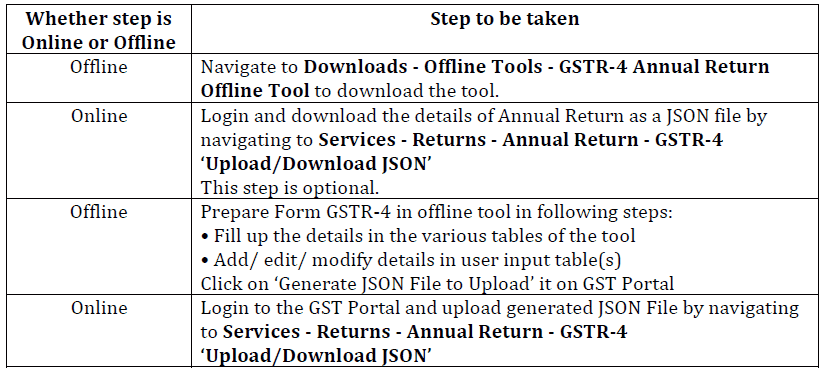 How to use offline Tool to prepare Form GSTR-4[/caption]
Details which can be entered in Offline Tool: Users can enter details in various Tables like Table 3 (a) (Aggregate turnover for previous FY), 4A (Inward supplies from registered suppliers), 4B & 4C (Inward supplies received from a registered/ unregistered supplier on RCM basis), 4D (Import of services) & 6 (only Row 12 to 16: Tax rate wise details of outward supplies during the year (Net of advances, credit/debit notes/adjustments)).
Details which are un-editable in Offline Tool: Details in Table 5 (Summary of self-assessed liability as per FORM GST CMP-08), 6 (Row 1 to 11: Tax liability on RCM basis auto-populated from Table 4B, 4C & 4D) & 7 (TDS/TCS Credit received) are non-editable.
Some important points related to using offline tool are:
How to use offline Tool to prepare Form GSTR-4[/caption]
Details which can be entered in Offline Tool: Users can enter details in various Tables like Table 3 (a) (Aggregate turnover for previous FY), 4A (Inward supplies from registered suppliers), 4B & 4C (Inward supplies received from a registered/ unregistered supplier on RCM basis), 4D (Import of services) & 6 (only Row 12 to 16: Tax rate wise details of outward supplies during the year (Net of advances, credit/debit notes/adjustments)).
Details which are un-editable in Offline Tool: Details in Table 5 (Summary of self-assessed liability as per FORM GST CMP-08), 6 (Row 1 to 11: Tax liability on RCM basis auto-populated from Table 4B, 4C & 4D) & 7 (TDS/TCS Credit received) are non-editable.
Some important points related to using offline tool are:
• Click on “Validate” button, to validate data in each worksheet in offline tool, after all details have been filled in that sheet.
• In case of validation failure of details on uploading JSON file, an error file will be generated with status as “Processed with Error”. This file can be downloaded, open in offline too, corrected and can be up loaded again by creating a JSON file again.
• Upon upload of this JSON file, these records will get incrementally added to the records uploaded earlier. If there are pre-existing records on the Portal, against same PAN/GSTIN, those details will get replaced/updated.

• Payment of Taxes can be made only online after logging into the GST Portal.
About Author


Reetu
Content Manager
 Studycafe
 Delhi, Delhi, India
 8071
8071My Recent Articles
- Income Tax Guide for Indian Defence Personnel for Tax Filing, Taxable Allowances and Other Benefits
- Income Tax Return Breaking: ITR Forms released for AY 25-26
- Ex-DRT Officials Sentenced to 5 Years Rigorous Imprisonment by Madras High Court along with Rs.27 Lakh Fine
- GSTN issued Advisory on Case Sensitivity in IRN Generation
- RBI to issue Notes of Rs.10 and Rs.500 bearing Signature of Guv Malhotra
Loading suggestions…


Recent Posts



All Posts



Tags
No tags yet.
Recent Posts
All Posts
Tags
No tags yet.