ICMAI Notifies Instructions for Mock Test For CAT Course 2022
ICMAI Notifies Instructions for Mock Test For CAT Course 2022 The Institute of Cost Accountants of India( ICMAI ) Notifies Instruction for Mock Test …
 Reetu
Reetu Jul 18, 2022
Table of Contents

ICMAI Notifies Instructions for Mock Test For CAT Course 2022
The Institute of Cost Accountants of India(ICMAI) Notifies Instruction for Mock Test For CAT Course 2022 that will be going to held on 19th July & 20th July 2022.
[caption id="attachment_145961" align="aligncenter" width="584"]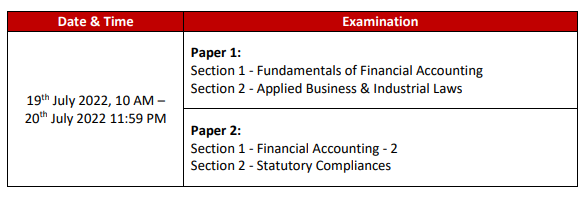 Mock Test For CAT Course[/caption]
Mock Test For CAT Course[/caption]
BEFORE THE EXAMINATION
- Please keep you Government Identity Proof (e.g. voter card, driving license, Aadhaar, etc.) /Student ID card with you. Picture of this needs to be clicked on the online examination page before starting the exam.
- Please keep your login details (Registration ID, Date of Birth and Passkey) before starting the examination. Once you open the examination page, you will not be able to access your mails/files on your laptop/mobile.
- Please sit in a quiet room. Try to avoid bright lights behind you, e.g. Windows.
- Please update your Google Chrome and give permission to your Webcam and Microphone from settings before your download the applications on your Laptop/Mobile.
- The examination will start sharp at 10 AM. Please ensure you login at 10 itself.
- Please make sure you have enough power backup so that in case of electricity failure, your laptop or mobile does not shut down/switch off. Also, please use a fast and reliable internet connection during the exam so that you do not face any internet issues.
BASIC INFRASRUCTURAL REQUIREMENT FOR THE EXAMINATION
Laptops/Desktops:- Continuous Internet connection with 1 - 4 MBPS speed
- Laptop or desktop with Webcam and microphone (functioning)
- Recommended Browser – Google Chrome (Latest version)
- Android version 5 and above
- Mobile phone with a functional Front Camera
About Author


Reetu
Content Manager
Reetu is a Content Writer with 4+ years of experience in GST, Income Tax, Finance, Company Law, Education and Career Related Content. She is a B.COM (Honrs.) Graduate.
Reetu is a Content Writer with 4+ years of experience in GST, Income Tax, Finance, Company Law, Education and Career Related Content. She is a B.COM (Honrs.) Graduate.
 Studycafe
 Delhi, Delhi, India
 8071
8071My Recent Articles
- Income Tax Guide for Indian Defence Personnel for Tax Filing, Taxable Allowances and Other Benefits
- Income Tax Return Breaking: ITR Forms released for AY 25-26
- Ex-DRT Officials Sentenced to 5 Years Rigorous Imprisonment by Madras High Court along with Rs.27 Lakh Fine
- GSTN issued Advisory on Case Sensitivity in IRN Generation
- RBI to issue Notes of Rs.10 and Rs.500 bearing Signature of Guv Malhotra
Up Next
Loading suggestions…


Recent Posts

All Posts

Recent Posts
All Posts