New functionality on GST portal Comparison of Liability Declared & ITC Claimed
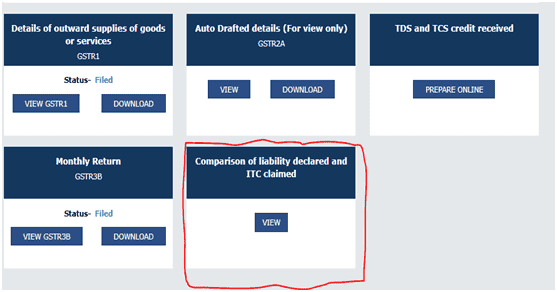
New functionality on GST portal Comparison of Liability Declared & ITC Claimed New Functionality is available on GST Portal where one ca
 CA Deepak Gupta
 Mar 17, 2019
New functionality on GST portal Comparison of Liability Declared & ITC Claimed
New Functionality is available on GST Portal where one can Compare the Input Tax Credit taken in GSTR-3B and that available in GSTR-2A. This tool is a great help for making GST Reconciliation for Annual Return or making ITC Reconciliation for Finding out that how much ITC we have claimed in GSTR-3B and how much is reflected in GSTR-2A.
This is for view and download in Excel Comparison of liability 3B with GSTR-1 and GSTR 2A

1. Liability other than export / RCM
2. Liability due to RCM
3. Liability due to Export and SEZ supplies

4. ITC credit claim and due ITC claimed in GSTR- 3B vs ITC available as per GSTR-2A All above detail available for FY 17-18 & FY 18-19
New functionality on GST portal Comparison of Liability Declared & ITC Claimed
A. After click on view tab following window will get opened, where we can check the:
1. Tax liability as per GSTR-1 and as per GSTR-3B
2. ITC claimed in GSTR-3B and accrued as per GSTR-2A
For the whole financial year.
Also after clicking on Download button, we can download the file in excel format.

B. When we click on Liability (other than zero rated (Exports and SEZ Supplies) and reverse charge supply) tab following window will get opened, where we can check the:
1. Liability declared in GSTR-3B during the month[as per table 3.1(a)]
2. Liability declared in GSTR-1 (other than reverse charge supply) during the month(as per table 4A,5, 6C,7, 9A, 9B, 9C,10,11)
3. Shortfall (-)/ Excess (+) in liability (GSTR3B GSTR1)
4. Cumulative Shortfall (-)/ Excess (+) in liability (GSTR3B GSTR1)
For the whole financial year.
Also after clicking on Download button, we can download the file in excel format.

C. When we click on Liability due to receipt of reverse charge supplies tab following window will get opened, where we can check the:
1. Liability declared in GSTR-3B during the month [as per table 3.1(d)]
2. Amount auto-populated in GSTR-2A[as per Part-A]
3. Shortfall (-)/ Excess (+) in liability (GSTR3B - GSTR2A)
4. Cumulative Shortfall (-)/ Excess (+) in liability (GSTR3B - GSTR2A)
For the whole financial year.
Also after clicking on Download button, we can download the file in excel format.

D. When we click on Liability (Export and supplies to SEZ) tab following window will get opened, where we can check the:
1. Liability declared in GSTR-3B during the month [as per table 3.1(b)]
2. Liability declared in GSTR-1 (Zero rated supplies) [as per table 6A, 6B, 9A, 9B, 9C]
3. Shortfall (-)/ Excess (+) in liability (GSTR3B GSTR1)
4. Cumulative Shortfall (-)/ Excess (+) in liability (GSTR3B GSTR1)
For the whole financial year.
Also after clicking on Download button, we can download the file in excel format.

E. When we click on ITC credit claimedand due tab following window will get opened, where we can check the:
1. ITC claimed in GSTR-3B during the month [as per table 4A(3)+4A(4)+4A(5)+4D(1)+4D(2)-4B(1)-4B(2)]
2. ITC auto-populated in GSTR-2A during the month [as per Part-A, PART-B]
3. Shortfall (-)/ Excess (+) in liability (GSTR3B - GSTR2A)
4. Cumulative Shortfall (-)/ Excess (+) in liability (GSTR3B - GSTR2A)
For the whole financial year.
Also after clicking on Download button, we can download the file in excel format.

This Article has been Authored by CS Shashank Kothiyal. He can be contacted at below mentioned details:
+91-7838165739 | [email protected]
About Author


CA Deepak Gupta
Co Founder
 StudyCafe
 Delhi, Delhi, India
 3423
3423My Recent Articles
- UltraTech Cement slapped with Rs. 808.78 Cr Income Tax Demand
- GST: High Court upheld constitutional validity of Section 16(2)(c), asks government to address ITC issues of genuine purchasers
- Old vs New Tax Regime for Tax Year 2026-27
- High court criticizes Income Tax Department for not releasing ITR Utilities despite 11 years of directions
- Fino Payments Bank CEO Rishi Gupta Gets Bail in GST Case, Bank Clarifies No Direct Link
Loading suggestions…


Recent Posts

All Posts

Tags
No tags yet.
Recent Posts
All Posts
Tags
No tags yet.