NEW GSTR Offline Tool Prototype Released on GST Portal
New GSTR Offline Tool Prototype Released on GST Portal Web based Prototype of Offline Tool of New Return is an interactive demo or mock-up o
 CA Deepak Gupta
 May 23, 2019
New GSTR Offline Tool Prototype Released on GST Portal
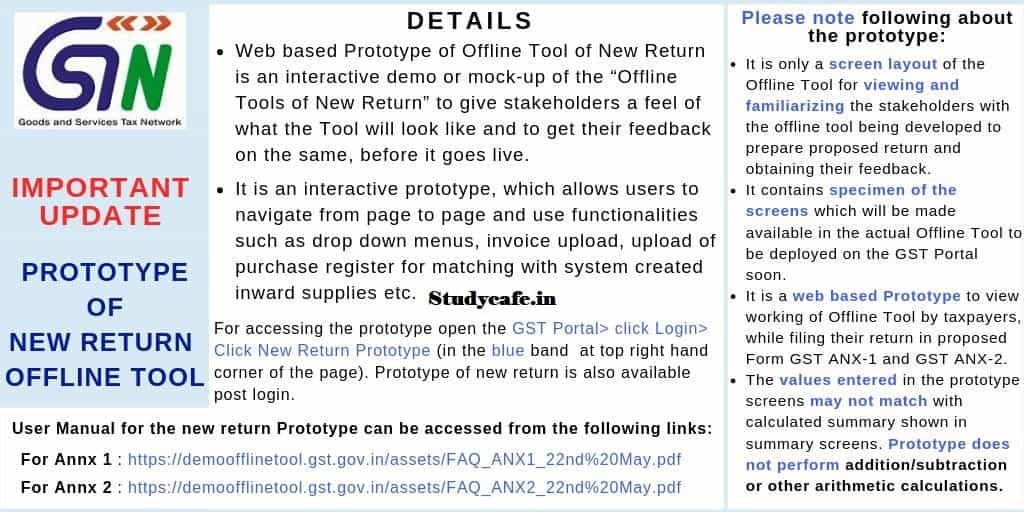
Web based Prototype of Offline Tool of New Return is an interactive demo or mock-up of the "Offline Tools of New Return" to give stakeholders a feel of what the tool will look like and to get their feedback on the same, before it goes live.
It is an interactive prototype, which allows users to navigate from page to page and use functionalities such as drop down menus, invoice upload, upload of purchase register for matching with system created inward supplies etc.

For accessing the prototype open the GST Portal> click Login> Click New Return, Prototype (in the blue band at top right hand corner of the page). Prototype of new return is also available post login.
Steps to Prepare Form GST ANX-1 Offline Using the Prototype ANX-1 Offline Tool
A. Add/ Modify Profile

B. Open the Home Screen of the Offline Tool
C. Import Data Using EXCEL or CSV FILES
D. View Summary
E. Prepare Table-wise Details:
i. 3A- Supplies to unregistered persons/consumers (B2C)
ii. 3B- Supplies to registered persons (B2B)
iii. 3C & 3D- Exports with/without payment of tax (EXP)
iv. 3E & 3F- Supplies to SEZ with/without payment of tax (SEZ)
v. 3G- Deemed exports (DE)
vi. 3H- Inward supplies attracting reverse charge (RCM)
vii. 3I- Import of goods (IMPG)
viii. 3J- Import of services (IMPS)
ix. 3K- Import of goods from SEZ units/developers (IMPG SEZ)
x. 3L- Missing documents (provisional credit availed)
xi. 4- Supplies made through e-commerce operators
xii. 3BA. Amendment regular- registered persons (B2BA)
xiii. 3BAO. Amendment (others)- registered persons (B2BAO)
xiv. 3EA & 3FA. Amendment- Supplies to SEZ with/without payment of tax (SEZA)
xv. 3GA. Amendment- Deemed exports (DEA)
F. View Draft Return
Steps to Take Actions in GST ANX-2 Offline Tool on pre filled details in the PROTOTYPE:
A. Add/ Modify Profile
B. Open the Home Screen of the GST ANX-02 Offline Tool
C. Import and View Purchase Register
D. Match Purchase Register with the entries of GST ANX-2
E. Take Actions in GST ANX-2
F. View Distribution of ISD Credits Received
G. View Summary of GST ANX-2
H. View Summary of Input Tax Credit
I. View Draft Return
User Manual for the new return Prototype can be accessed from the following links:
Annx 1
Annx 2
Please note following about the prototype:
It is only a screen layout of the Offline Tool for viewing and familiarizing the stakeholders with the offline tool being developed to prepare proposed return and obtaining their feedback.
It contains specimen of the screens which will be made available in the actual Offline Tool to be deployed on the GST Portal soon.
It is a web based Prototype to view working of omine Tool by taxpayers, while filing their return in proposed Form GST ANX-1 and GST ANX-2.
The values entered in the prototype screens may not match with calculated summary shown in summary screens. Prototype does not perform addition/subtraction or other arithmetic calculations.
About Author


CA Deepak Gupta
Co Founder
 StudyCafe
 Delhi, Delhi, India
 3423
3423My Recent Articles
- UltraTech Cement slapped with Rs. 808.78 Cr Income Tax Demand
- GST: High Court upheld constitutional validity of Section 16(2)(c), asks government to address ITC issues of genuine purchasers
- Old vs New Tax Regime for Tax Year 2026-27
- High court criticizes Income Tax Department for not releasing ITR Utilities despite 11 years of directions
- Fino Payments Bank CEO Rishi Gupta Gets Bail in GST Case, Bank Clarifies No Direct Link
Loading suggestions…


Recent Posts


All Posts


Tags
No tags yet.
Recent Posts
All Posts
Tags
No tags yet.