Verifying Income Tax Return made Simple & Easy!
31st March, 2018is the last day for filing your income tax return or ITR for the financial yearFY 2015-2016 and 2016-2017
But even after filing your ITR online, your job won't still be over:
You are supposed to verify your income tax return after e-filing and failing to do so may make your e-filed ITR as invalid. This may lead to additional tax demand or loss of refund:
Verify the ITR or dispatch ITR-V
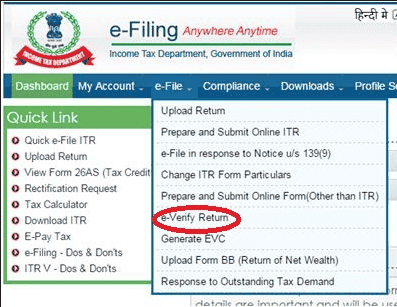
The primary thing that one should do just after e-filing is that either s/he should e-verify her/his ITR or dispatch ITR-V to CPC Bangalore.
| A. |
Methods of Electronic verification of ITR: |
| 1. |
E-Verify Return via Netbanking |
Step 1: Login to your Net banking account
Step 2: Click on income tax e-filing link provided by the bank
Step 3: Click on E-Verify link against the return to be verified.
| Here is the list of Banks which provide this service. |
- Allahabad Bank
- Andhra Bank
- Axis Bank Ltd
- Bank of Baroda
- Bank of India
- Bank of Maharashtra
- Canara Bank
- Central Bank of India
- City Union Bank Ltd
- Corporation Bank-Corporate Banking
- Corporation Bank-Retail Banking
- Dena Bank
- Equitas Small Finance Bank Ltd
- HDFC Bank
- ICICI Bank
- IDBI Bank
- Indian Bank
- Indian Overseas Bank
- IndusInd Bank Ltd
- Karnataka Bank
- Kotak Mahindra Bank
- Oriental Bank of Commerce
- Punjab National Bank
- Punjab and Sind Bank
- South Indian Bank
- State Bank of India
- Syndicate Bank
- The Federal Bank Limited
- The Karur Vysya Bank Ltd
- UCO Bank
- Union Bank of India
- United Bank of India
- Vijaya Bank
- Yes Bank Ltd
|
| 2. |
E-Verify Return via Bank ATM |
Step 1: Swipe your ATM card in Bank ATM
Step 2: Click on PIN for E-filing
Step 3: EVC will be received on registered mobile number
Step 4: Login to E-filling portal & select option to E-Verify return using Bank ATM
Step 5: Enter the EVC which was received on E-filing Portal.
| Here is the list of Banks which provide this service. |
- Axis Bank Ltd
- Central Bank of India
- ICICI Bank
- State Bank of India
- Canara Bank
- IDBI Bank
|
| 3. |
E-Verify Return via Aadhaar OTP |
Step 1: Link Aadhaar number with PAN
Step 2: Select option to E-Verify return using Aadhar OTP
Step 3: EVC will be received on registered mobile number
Step 4: Enter the EVC which was received on E-filing Portal.
| 4. |
E-Verify Return via Bank Account Number |
Step 1: Pre validate your bank account number
Step 2: Select option to E-Verify return using Bank account number
Step 3: EVC will be received on registered mobile number
Step 4: Enter the EVC which was received on E-filing Portal.
| Here is the list of Banks which provide this service. |
- Punjab National Bank
- United Bank of India
- ICICI Bank
- State Bank of India
- Canara Bank
- Kotak Mahindra Bank
- HDFC Bank
- Syndicate Bank
- Saraswat Bank
- Andhra Bank
- Oriental Bank of Commerce
- Bank of Baroda
- Central Bank of India
- IDBI Bank
- Union Bank of India
- Karur Vysya Bank
|
| 5. |
E-Verify Return via Demat Account Number |
Step 1: Pre validate your Demat account number
Step 2: Select option to E-Verify return using Demat account number
Step 3: EVC will be received on registered mobile number
Step 4: Enter the EVC which was received on E-filing Portal.
This Service is available with both NSDL and CDSL
| B. |
Dispatching ITR-V to CPC, Bangalore: |
If you have not verified your ITR electronically then you are supposed to send signed copy of ITR-V to CPC, Bangalore within 120 days of e-filing.If you have opted to verify the ITR by sending signed copy of ITR-V then you must continuously track the receipt status of ITR-V at CPC.Once Central Processing Unit Bangalore receives your ITR-V form, it dispatches an email acknowledging the receipt of ITR-V which should reach you within a month of sending ITR-V to CPC Bangalore.
| C. |
Using Digital Signature: |
Step 1: Download ITD e-Filing DSC Management Utility from the link provided in e-Filing website at the time of XML upload.
Step 2: Extract the zip folder and open the utility (DSC_MGMT_UTILITY.jar).
Step 3: The utility will get opened as mentioned below.
Select Register/Reset Password Using DSC tab.
Step 4: Enter the e-Filing User ID.
Step 5: Enter the PAN of the DSC registered in e-Filing. In case of NRI User this is not a Mandatory Field
Step 6: Select the type of DSC (PFX/USB)
Step 6: Enter Password &Click Generate Signature file button.
A success message will be displayed and signature file will be generated which is used for registering DSC at portal.
Step 7: After registration we need to upload xml with our DSC
Step 8: Select a valid USB token certificate.
Step 9:Enter DSC token PIN & click on K.A success message will be displayed and signature file will be generated and saved at the location where XML was stored. Upload this DSC file along with the ITR.
Verifying Income Tax Return made Simple & Easy!
After verification & processing of ITR, wait for around one month to get the intimation from IT department under section 143(1). You will receive another email from IT department once your income tax return gets processed. This email is called
Intimation under section u/s 143(1).Intimation tells you the details about your total TDS deducted, total tax paid, and deductions, if any.
 CA Deepak Gupta
 Feb 23, 2018


 StudyCafe
 Delhi, Delhi, India
 3423
3423