How to use new offline utility for Filing ITR Forms | AY 2021-22
Reetu | Apr 5, 2021 |

How to use new offline utility for Filing ITR Forms | AY 2021-22
As we know that Income Tax Return Forms [ITR Forms] 1 and 4 have been made available by CBDT.
All the Income Tax Return Forms [ITR Forms] have been notified by CBDT.

Taxpayers who are eligible to file Income Tax Return Forms [ITR Forms] 1 and 4 and do not have TDS Deduction can file their Returns.
Once you access the e-filing portal . You can download the Utility under:
Downloads -> Offline Utilities -> Income Tax Return Preparation Utilities.

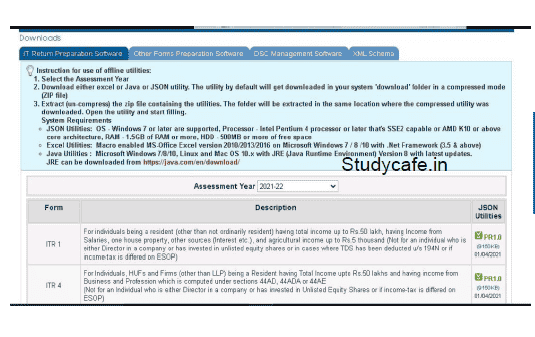
On click of link for the Utility presented against ITR-1 or ITR-4, a ZIP file will start getting downloaded on your system.
Open the Utility from the extracted folder.

After you Extract the downloaded utility as a ZIP file, open the Utility from the extracted folder. In case, you receive this message, you click the “Run Anyway” option in the dialogue box.

Once you click on “Run Anyway”, your utility will start installing, after which you can proceed with filing your ITR.

As soon as you install the utility, you will be landed on Homepage.
Click on “Continue” to fill your Income Income-tax Return for AY 2021-22.

You will find 3 tabs:-

After click on “File returns”, select the radio button to “Import pre-filled data”.
On click of this option, the prefilled data already saved by you on your system in .json format can be imported to prefill the information in the income tax return.

Enter the “PAN” for whom you want to fill the return and select the “Assessment year” and click on “Proceed”.
Assessment Year 2021-22 can only be selected.

Pre-filled JSON can be downloaded post login to the e-Filing portal from:
My Account -> Download Pre Pre-Filled for AY 2021-22 and can be imported to the utility for prefilling the personal and other available details.

Attach the pre pre-filled JSON file from your system and click on “proceed”.

On click of Proceed in the earlier screen, you will be navigated to Income Tax Returns screen, where you can see the Basic pre-filled details from the imported JSON file.
Click on “File Return” to continue.

Select the Status applicable to you and click on Continue.
The status will be pre-filled based on your last year’s data and will be editable.

Select the ITR type which you want to file from the dropdown and “Proceed”.
A user-friendly questionnaire to identify ITR applicable to you will be available in a subsequent releases of the offline utility.

Click on “Let’s get started” to start filling your return.

Fill the applicable and mandatory fields of the ITR form -> Validate all the tabs of the ITR form and Tax will be calculated.

After confirming all the schedules, you can Preview and submit your Return.

You can either “Download” or “Print” the preview by clicking on the respective buttons.
You can download the Preview on your system.
It will be downloaded in pdf format.

Click on “Proceed to validation”, to validate the Return.

All the errors needs to be validated by the user after that he can “Download JSON”.
Just click on the error, you will be navigated to the field related to that error.


In case of any Doubt regarding Membership you can mail us at [email protected]
Join Studycafe's WhatsApp Group or Telegram Channel for Latest Updates on Government Job, Sarkari Naukri, Private Jobs, Income Tax, GST, Companies Act, Judgements and CA, CS, ICWA, and MUCH MORE!"