How to Download free GST Accounting and Billing Software [GSTN Update]
![How to Download free GST Accounting and Billing Software [GSTN Update]](https://assets.studycafe.in/_v/1280/uploads/2019/03/2-3.png)
How to Download free GST Accounting and Billing Software [GSTN Update] In 32nd GST council, if was announced that Free GST Accounting and Bi
 CA Deepak Gupta
 Mar 29, 2019
How to Download free GST Accounting and Billing Software [GSTN Update]
In 32nd GST council, if was announced that Free GST Accounting and Billing Software shall be provided to Small Taxpayers by GSTN.
Facility of same has been created on GST Website. The download functionality is available for Micro, Small and Medium Enterprises (MSMEs) having turnover of less than One Crore fifty Lakh Rupees

How to Download free GST Accounting and Billing Software [GSTN Update]
Process of same is given below
Step 1 : After login go to downloads and then click on Accounting and Billing Software.
Step 2 : Option for free GST Accounting and Billing Software will come.

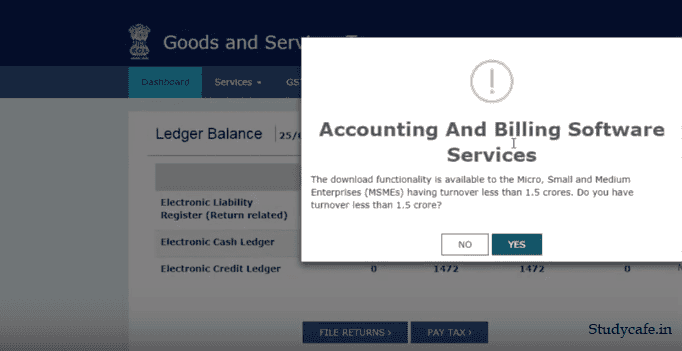
Now this download functionality is available for Micro, Small and Medium Enterprises (MSMEs) having turnover of less than One Crore fifty Lakh Rupees.
In accordance with the provision of Micro, Small & Medium Enterprises Development (MSMED) Act, 2006 the Micro, Small and Medium Enterprises (MSME) are depicted below:
| Manufacturing Sector | Service Sector | ||
| Enterprises | Investment in plant & machinery | Enterprises | Investment in equipment |
| Micro Enterprises | Does not exceed Rs. 25 Lakh | Micro Enterprises | Does not exceed Rs. 10 Lakh |
| Small Enterprises | More than Rs. 25 Lakh but does not exceed Rs. 5 Crore | Small Enterprises | More than Rs. 10 Lakh but does not exceed Rs. 2 Crore |
| Medium Enterprises | More than Rs. 5 Crore but does not exceed Rs. 10 Crore | Medium Enterprises | More than Rs. 2 Crore but does not exceed Rs. 5 Crore |
Note : As per press release dated 07-February-2018 the government was to amend the criteria from defining MSME on turnover basis, but the same is not applicable as no notification has been issued for the same.
Step 4 : Then you will get list of available softwares :
You can click the "Common Free Features" link under Features Offered (Free of Cost) to view the list of common features offered by the Accounting and Billing Software.
A pop-up message is displayed. User MUST read the disclaimer by GSTN and accordingly accept or reject the declaration. Once you click the ACCEPT button, you will be directed outside the GST Portal to download the software.
Note: If you click the REJECT button, you will land back to the Accounting and Billing Software page.
About Author


CA Deepak Gupta
Co Founder
 StudyCafe
 Delhi, Delhi, India
 3423
3423My Recent Articles
- UltraTech Cement slapped with Rs. 808.78 Cr Income Tax Demand
- GST: High Court upheld constitutional validity of Section 16(2)(c), asks government to address ITC issues of genuine purchasers
- Old vs New Tax Regime for Tax Year 2026-27
- High court criticizes Income Tax Department for not releasing ITR Utilities despite 11 years of directions
- Fino Payments Bank CEO Rishi Gupta Gets Bail in GST Case, Bank Clarifies No Direct Link
Loading suggestions…


Recent Posts
All Posts
Tags
No tags yet.
Recent Posts
All Posts
Tags
No tags yet.