ICAI UPDATE: Addendum to FAQs on Unique Document Identification Number (UDIN):

The Institute of Chartered Accountants of India (ICAI) has issued an addendum to FAQs on Unique Document Identification Number (UDIN).
ICAI issued Addendum to FAQs on UDIN
 Reetu
Reetu Jan 4, 2025
Table of Contents

ICAI UPDATE: Addendum to FAQs on Unique Document Identification Number (UDIN)
The Institute of Chartered Accountants of India (ICAI) has issued an addendum to FAQs on Unique Document Identification Number (UDIN).
FAQs on UDIN
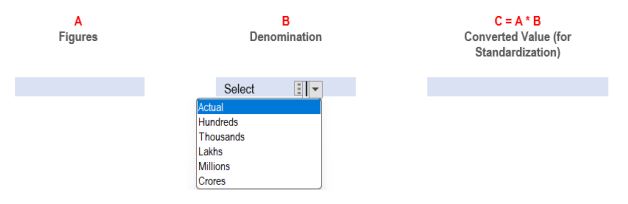 The following example is demonstrated for better clarity-
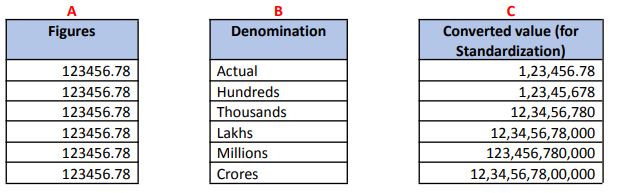 The change will allow members to enter absolute numbers up to two decimal places and choose a denomination from a dropdown menu. The entered figure will be multiplied by the chosen denomination, and the final value will be displayed in the third column, entitled "Converted Value (for standardisation)."
The figures will be displayed in this format under the List UDIN, and the same format will also be shown to the verifier in the Verifier.
The change will allow members to enter absolute numbers up to two decimal places and choose a denomination from a dropdown menu. The entered figure will be multiplied by the chosen denomination, and the final value will be displayed in the third column, entitled "Converted Value (for standardisation)."
The figures will be displayed in this format under the List UDIN, and the same format will also be shown to the verifier in the Verifier.
Q1. The data type for capturing figure has been changed from alphanumeric to numeric. What are the effects of this change?
Ans. The data type for capturing the figure of the parameters has been changed from alphanumeric to numeric under all categories, namely, Certificate, GST and Tax Audit and Audit and Assurance Functions in a phased manner at the UDIN portal. They have come to the force from the dates as under:- For certificates w.e.f. 6th December, 2024.
- For GST and Tax Audit w.e.f. 13th December, 2024.
- For Audit and Assurance Functions w.e.f. 20th December, 2024.
The following example is demonstrated for better clarity-
The change will allow members to enter absolute numbers up to two decimal places and choose a denomination from a dropdown menu. The entered figure will be multiplied by the chosen denomination, and the final value will be displayed in the third column, entitled "Converted Value (for standardisation)."
The figures will be displayed in this format under the List UDIN, and the same format will also be shown to the verifier in the Verifier.
Q2. How to enter alphanumeric values during the generation of UDIN for certificates?
Ans. There are three fields that are required to be filled in during the generation of UDIN for certificates. Out of these three fields, two are mandatory in nature, however, the third field is optional/non-mandatory. The two mandatory fields will accept numeric values, whereas the third one, optional/non-mandatory field, will accept alphanumeric values. Extra fields can be added by the “Add More” option, which will accept alphanumeric values.Q3. How to enter alphanumeric values during UDIN generation for GST & Tax Audit?
Ans. Since the data type has been changed from alphanumeric to numeric under the GST and tax audit category, the mandatory fields will accept numeric values, whereas the optional/non-mandatory field will accept alphanumeric values. Extra fields can be added by the “Add More” option, which will accept alphanumeric values.Q4. How to enter alphanumeric values during UDIN generation for Audit and Assurance Functions?
Ans. Since the data type has been changed from alphanumeric to numeric under the Audit and Assurance Functions category, the mandatory fields will accept numeric values, whereas the optional/non-mandatory field will accept alphanumeric values. Extra fields can be added by the “Add More” option, which will accept alphanumeric values.Q5. Will this change affect other parameters as well, such as those where we enter comments and other details related to the document?
Ans. No, the change specifically pertains to the data type for capturing numerical figures only. Other parameters, including those for comments and additional details related to the document, will remain unchanged. Members can continue to enter comments and other relevant information in the existing format.Q6. Will this change apply retroactively to previously issued UDINs?
Ans. No, the change will apply only to new entries made after the transition is implemented for each category.About Author


Reetu
Content Manager
Reetu is a Content Writer with 4+ years of experience in GST, Income Tax, Finance, Company Law, Education and Career Related Content. She is a B.COM (Honrs.) Graduate.
Reetu is a Content Writer with 4+ years of experience in GST, Income Tax, Finance, Company Law, Education and Career Related Content. She is a B.COM (Honrs.) Graduate.
 Studycafe
 Delhi, Delhi, India
 8071
8071My Recent Articles
- Income Tax Guide for Indian Defence Personnel for Tax Filing, Taxable Allowances and Other Benefits
- Income Tax Return Breaking: ITR Forms released for AY 25-26
- Ex-DRT Officials Sentenced to 5 Years Rigorous Imprisonment by Madras High Court along with Rs.27 Lakh Fine
- GSTN issued Advisory on Case Sensitivity in IRN Generation
- RBI to issue Notes of Rs.10 and Rs.500 bearing Signature of Guv Malhotra
Up Next
Loading suggestions…


Recent Posts



All Posts



Tags
No tags yet.
Recent Posts
All Posts
Tags
No tags yet.