Process of Enrolling and Functioning as a GST Practitioner
Process of Enrolling and Functioning as a GST Practitioner GST Practitioner is a tax professional who can prepare returns and perform other
 CA Deepak Gupta
 May 12, 2019
Table of Contents

Process of Enrolling and Functioning as a GST Practitioner
GST Practitioner is a tax professional who can prepare returns and perform other activities on the basis of the information furnished to him by a taxable person.
For Becoming a GST Practitioner, a tax professional needs to enroll as a GST Practitioner and give a Computer Based Exam conducted by NACIN. The registration for the exam can be done by the eligible GSTPs on a registration portal, link of which will be provided on NACIN and CBIC websites.

Two such examinations for such GSTPs have already been conducted on 31.10.2018 and 17.12.2018. The next examination for them shall be conducted on 14.06.2019 from 1100 hrs to 1330 hrs at designated examination centers across India.
Below are the FAQ's on GST Practitioner:
Process of Enrolling and Functioning as a GST Practitioner
Enrolling as a GST Practitioner
1. Who is a GST Practitioner
GST Practitioner is a tax professional who can prepare returns and perform other activities on the basis of the information furnished to him by a taxable person. (However, the legal responsibility of such filings remains with the Taxpayer.) For this purpose, GST Practitioners (GSTP) are required to be enrolled with Centre or State Authority. CA/ CS/ CMA holding Certificate of Practice (COP), Advocates, Retired Government Officials, and Graduates are eligible to apply for registration. In addition, GSTPs can be appointed Authorized Representatives who can act on the behalf of the taxpayers and represent them before tax authorities.

2. Can I file Returns for my client if I am not registered
It is recommended that you register as a GST Practitioner at the GST Portal to file Returns for your client.
3. Are there any preconditions before I can enroll on the GST Portal as a GST Practitioner
A GST Practitioner must fulfill following conditions he/she can enroll on the GST Portal:
1. Applicant must have a valid PAN Card
2. Applicant must have a valid mobile number
3. Applicant must have a valid e-mail ID
4. Applicant must have a Professional address
5. Applicant must have the prescribed documents and information on all mandatory fields as required for Enrolment
6. Applicant must fulfill the eligibility criteria of GST Practitioner.
4. What are the eligibility criteria an applicant must fulfill for becoming a GST Practitioner/enrolling on the GST Portal as a GST Practitioner
- Chartered Accountant holding COP
- Company Secretary holding COP
- Cost and Management Accountant holding COP
- Advocate
- Graduate or Postgraduate degree in Commerce
- Graduate or Postgraduate degree in Banking
- Graduate or Postgraduate degree in Business Administration
- Graduate or Postgraduate degree in Business Management
- Degree examination of any recognized Foreign University
- Retired Government Officials
- Sales Tax Practitioner under existing law
- Tax Return Preparer under existing law
5. I started to fill the Registration Application for GST Practitioner but was not able to complete it. Can I save my Registration Application
Yes, you can save your Registration Application up to 15 days from the day your TRN was generated upon successful submission of PART- A of the Registration Application.
6. What do I do after submitting my Registration Application
The Registration Application submitted by you will be processed by Tax Officer. Once your Registration Application is approved by the concerned Tax Official, your GSTP ID will be generated by the system along with a temporary password for first-time login and the same will be communicated to your registered e-mail address. ARN status will also be changed to Approved. Enrolment Certificate will be available at the Dashboard of the GSTP for view, print and download.
In case of rejection, Rejection Order will get generated and communicated to you. ARN status will be changed to Rejected. Intimation of Rejection will be sent to the applicant who filed the application for the enrolment of GSTP via email and SMS on his registered email address and mobile number respectively. Rejection Order will be available at the Dashboard of the GSTP for view, print and download
7. Do I need to register separately in each State and Union Territory
Single Enrolment shall be sufficient for practicing on all India basis. No separate registrations are required for other States or Centre. However, you are free to apply for another registration in other state if you have a Professional Address in that state.
Viewing List of Taxpayers
1. What happens to my list of taxpayers in GST Portal when I accept a taxpayers engagement request
When a GST Practitioner accepts an engagement request, the taxpayer gets added to the GST Practitioners client list.
2. What happens to my list of taxpayers in GST Portal when I reject a taxpayers engagement request
When a GST Practitioner rejects an engagement request, the GST Practitioners client list remains unaffected.
3. Can I be engaged by multiple taxpayers at a time
Yes. A GST Practitioner can simultaneously be engaged by multiple taxpayers, but a Taxpayer can engage with only one GST Practitioner at a time.
Accepting/ Rejecting Taxpayer
1. Can I engage with a taxpayer from a different state
Yes, you can engage with a taxpayer from a different state. At the time of enrolling as GST Practitioner, your enrollment application will be routed to the concerned State Tax Officer for processing. Once your enrollment gets approved, you can engage with Taxpayers registered in any state or jurisdiction of India.
2. Can I engage with multiple taxpayers at a time
Yes. A GST Practitioner can simultaneously be engaged by multiple taxpayers, but a Taxpayer can engage with only one GST Practitioner at a time.
3. Can I disengage with a taxpayer after accepting the engagement request
Yes. GST Practitioners can disengage with taxpayers at any point in time. Taxpayers too can choose to disengage from their end at any time, if they want.
4. Whether a GSTP can engage any taxpayer
No. Only taxpayer send request to GSTP for engagement which can be accepted by GSTP.
Performing Activities on Taxpayer's Behalf
1. How can I access functionality to perform functions on behalf of a taxpayer on GST Portal
Navigate to Services > User Services > List of Taxpayers > select Taxpayers GSTIN / UIN option.
Alternatively, you can also click LIST OF TAXPAYERS / CONTINUE TO DASHBOARD button on your Dashboard.
2. Can I perform function for more than one taxpayer at a time
No, you can perform function of only one taxpayer at a time.
3. Can I file applications on behalf of a taxpayer
No, you CANNOT submit any application on taxpayer's behalf. You can only save the application. To submit the application, taxpayer has to log in to the GST portal and file it using EVC or DSC as applicable.
4. I am not able to access certain functionalities on behalf of a taxpayer. Why
As a GST Practitioner, you have access to only those functionalities, for which you have been authorized by the concerned taxpayer, while filing the authorization form in your name at GST Portal by the concerned taxpayer.
5. What are the functions GST Practitioner can perform on the GST Portal on behalf of taxpayers
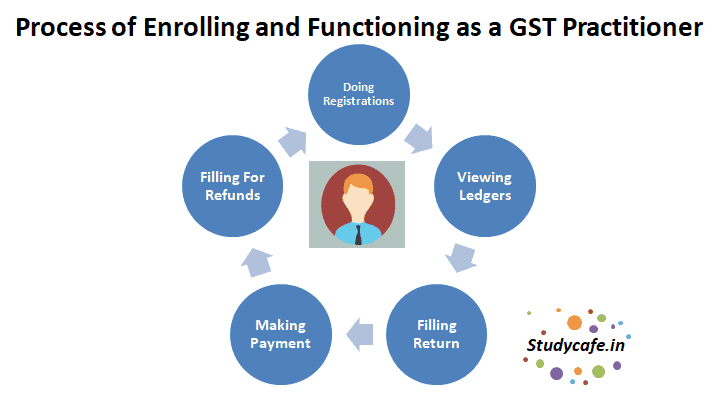
GST Practitioner can perform functions provided below on the GST Portal on behalf of a taxpayer.
Registration:
- Creating and saving the application for amendment of registration
- Creating and saving for filing clarifications (post grant of registration)
- Creating and saving the application to opt for Composition Levy
- Creating and saving the application to withdraw from Composition Levy
- Creating and saving the application for revocation of cancelled registration
- Tracking Application Status
Ledgers:
- Viewing Electronic Cash Ledger
- Viewing Electronic Credit Ledger
- Viewing Electronic Liability Register
Returns:
- Viewing Returns Dashboard
- Creating and preparing different returns (including invoice upload)
- Creating and preparing Annual return
- Tracking Return Status
- Viewing Transition Forms
- Viewing ITC Forms
Payments:
- Creating a Challan and make deposit (utilization can be done by taxpayer only)
- Viewing Saved Challan
- Viewing Challan History
User Services:
- Viewing Saved Application
- Viewing and Creating New Application for:
i. Advance Ruling
ii. Form DRC-03
iii. Letter of Undertaking
iv. Appeal
v. Rectification of Order
vi. Restoration of Provisional Attachment
vii. Deferred Payment/ Payment in Instalments
viii. Provisional Assessment ASMT-01
- Viewing and Downloading Certificates
- Viewing Notices and Orders
- Viewing Submitted Applications
- Viewing Cause List
- Searching HSN/ Service Classification Code
Refunds:
- Preparing a refund application
- Viewing Saved Refund Application
- Viewing Filed Refund Application
- Track Refund Application status
- View Electronic Liability Register from the link available in the refund application
GST PractitionerCANNOTsubmit any application on taxpayer's behalf. GST Practitioner can only save the application. Filing of the application has to be done by the taxpayerONLY.
About Author


CA Deepak Gupta
Co Founder
 StudyCafe
 Delhi, Delhi, India
 3423
3423My Recent Articles
- UltraTech Cement slapped with Rs. 808.78 Cr Income Tax Demand
- GST: High Court upheld constitutional validity of Section 16(2)(c), asks government to address ITC issues of genuine purchasers
- Old vs New Tax Regime for Tax Year 2026-27
- High court criticizes Income Tax Department for not releasing ITR Utilities despite 11 years of directions
- Fino Payments Bank CEO Rishi Gupta Gets Bail in GST Case, Bank Clarifies No Direct Link
Loading suggestions…


Recent Posts

All Posts
Tags
No tags yet.
Recent Posts
All Posts
Tags
No tags yet.