Download GST E-Flyer on complete GSTR-3B Filing Process:

The Central Board of Indirect Taxes and Customs (CBIC) has released GST Return Filing Procedure (FORM GSTR-3B) E-Flyer.
GST E-Flyer on complete GSTR-3B Filing Process
 Reetu
Reetu Nov 16, 2023
Table of Contents

Download GST E-Flyer on complete GSTR-3B Filing Process
The Central Board of Indirect Taxes and Customs (CBIC) has released the GST Return Filing Procedure (FORM GSTR-3B) E-Flyer.
Return Filing Procedure
Filing Form GSTR-3B - Monthly and Quarterly Return by Normal Taxpayer
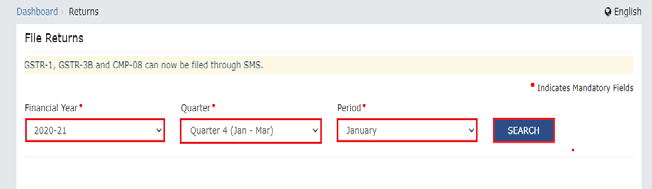
 3. The File Returns page is displayed. Select the Financial Year, Quarter (Quarter 1 - 4) and Period (Month) for which you want to file the return from the drop-down list. Click the SEARCH button.
 4. The File Returns page is displayed. This page displays the due date of filing the returns, which the taxpayer is required to file (using separate tiles). In the FORM GSTR-3B tile, click the PREPARE ONLINE button.
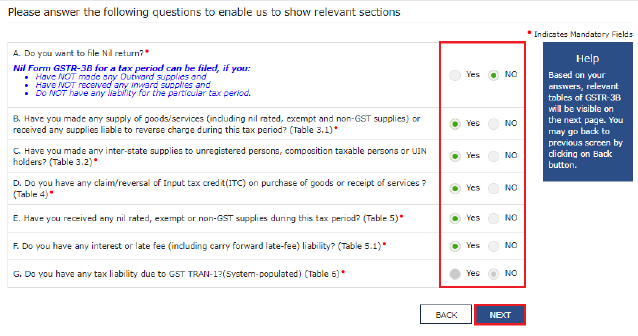
5. A list of questions are displayed. You need to answer all the questions to show the relevant sections of FORM GSTR 3B as applicable to you. Click the NEXT button. Based on your answers, relevant tables of FORM GSTR-3B will be visible on the next screen. You may go back to previous screen by clicking on BACK button.
Note: In case of auto-population from FORM GSTR-1 or FORM GSTR-2B, only the first question will be displayed in the questionnaire page.
4. The File Returns page is displayed. This page displays the due date of filing the returns, which the taxpayer is required to file (using separate tiles). In the FORM GSTR-3B tile, click the PREPARE ONLINE button.
5. A list of questions are displayed. You need to answer all the questions to show the relevant sections of FORM GSTR 3B as applicable to you. Click the NEXT button. Based on your answers, relevant tables of FORM GSTR-3B will be visible on the next screen. You may go back to previous screen by clicking on BACK button.
Note: In case of auto-population from FORM GSTR-1 or FORM GSTR-2B, only the first question will be displayed in the questionnaire page.
 To file Non-Nil return: The System Generated Summary for GSTR-3B is displayed. This page displays the details of GSTR-3B table, Source Form, Form Status, Summary Status and advisory. Click the CLOSE button to view FORM GSTR-3B – Monthly Return page.
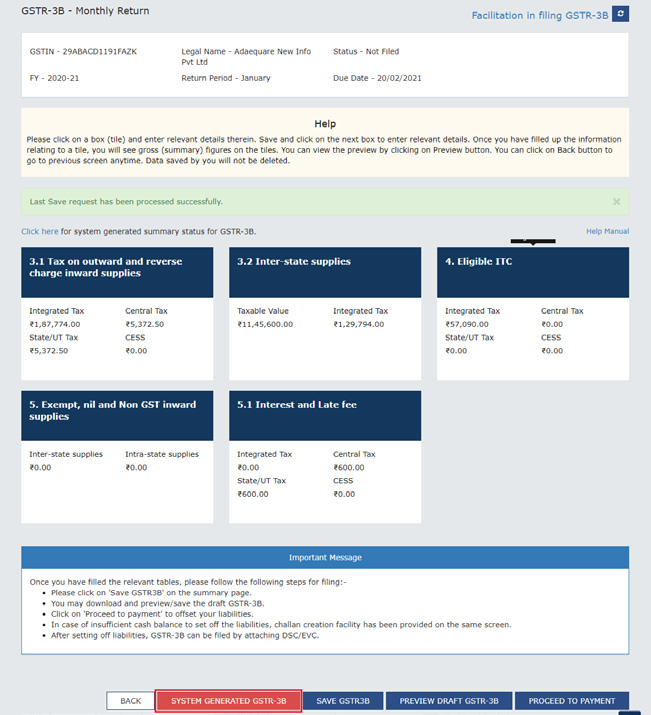
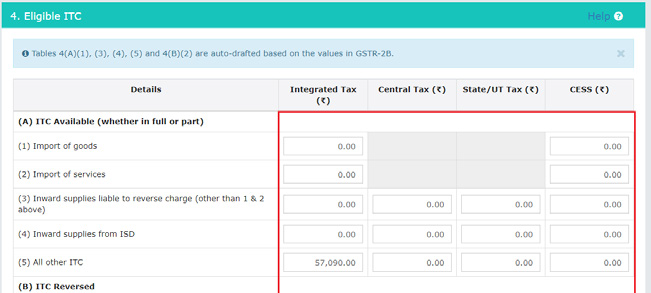 The FORM GSTR-3B – Monthly Return page is displayed. Click the SYSTEM GENERATED GSTR-3B button to download and view system-computed details from FORMS GSTR-1 and GSTR-2B (monthly or quarterly) in FORM GSTR-3B.
Note: Based on the selection made in previous page, applicable tiles will be visible to you for providing the details.
The FORM GSTR-3B – Monthly Return page is displayed. Click the SYSTEM GENERATED GSTR-3B button to download and view system-computed details from FORMS GSTR-1 and GSTR-2B (monthly or quarterly) in FORM GSTR-3B.
Note: Based on the selection made in previous page, applicable tiles will be visible to you for providing the details.
 Note:
Note:
How can I create, save, pay taxes and file Form GSTR-3B return?
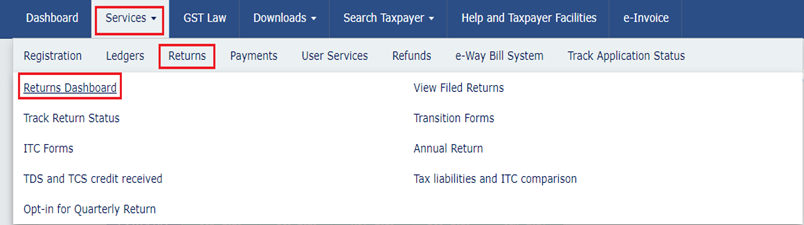
FORM GSTR-3B is a simplified summary return and the purpose of the return is for taxpayers to declare their summary GST liabilities for a particular tax period and discharge these liabilities. A normal taxpayer is required to file FORM GSTR-3B returns for every tax period. Login and Navigate to FORM GSTR-3B – Monthly Return page: 1. Access the www.gst.gov.in URL. The GST Home page is displayed. Login to the GST Portal with valid credentials. 2. Click the Services > Returns > Returns Dashboard option.
3. The File Returns page is displayed. Select the Financial Year, Quarter (Quarter 1 - 4) and Period (Month) for which you want to file the return from the drop-down list. Click the SEARCH button.
4. The File Returns page is displayed. This page displays the due date of filing the returns, which the taxpayer is required to file (using separate tiles). In the FORM GSTR-3B tile, click the PREPARE ONLINE button.
5. A list of questions are displayed. You need to answer all the questions to show the relevant sections of FORM GSTR 3B as applicable to you. Click the NEXT button. Based on your answers, relevant tables of FORM GSTR-3B will be visible on the next screen. You may go back to previous screen by clicking on BACK button.
Note: In case of auto-population from FORM GSTR-1 or FORM GSTR-2B, only the first question will be displayed in the questionnaire page.
To file Non-Nil return: The System Generated Summary for GSTR-3B is displayed. This page displays the details of GSTR-3B table, Source Form, Form Status, Summary Status and advisory. Click the CLOSE button to view FORM GSTR-3B – Monthly Return page.
The FORM GSTR-3B – Monthly Return page is displayed. Click the SYSTEM GENERATED GSTR-3B button to download and view system-computed details from FORMS GSTR-1 and GSTR-2B (monthly or quarterly) in FORM GSTR-3B.
Note: Based on the selection made in previous page, applicable tiles will be visible to you for providing the details.
Note:
- You can click the SYSTEM GENERATED GSTR-3B to view system-computed details from FORMS GSTR-1 & GSTR-2B.
- The values that are auto-populated in System Generated GSTR-3B is for the assistance of taxpayers. However, taxpayers have to ensure the correctness of the values being reported and filed in GSTR-3B in all respects.
- The auto-populated values can be edited by the taxpayers, if required. The taxpayers can continue their filing with the edited values, and system will not restrict the same.
About Author


Reetu
Content Manager
Reetu is a Content Writer with 4+ years of experience in GST, Income Tax, Finance, Company Law, Education and Career Related Content. She is a B.COM (Honrs.) Graduate.
Reetu is a Content Writer with 4+ years of experience in GST, Income Tax, Finance, Company Law, Education and Career Related Content. She is a B.COM (Honrs.) Graduate.
 Studycafe
 Delhi, Delhi, India
 8071
8071My Recent Articles
- Income Tax Guide for Indian Defence Personnel for Tax Filing, Taxable Allowances and Other Benefits
- Income Tax Return Breaking: ITR Forms released for AY 25-26
- Ex-DRT Officials Sentenced to 5 Years Rigorous Imprisonment by Madras High Court along with Rs.27 Lakh Fine
- GSTN issued Advisory on Case Sensitivity in IRN Generation
- RBI to issue Notes of Rs.10 and Rs.500 bearing Signature of Guv Malhotra
Up Next
Loading suggestions…


Recent Posts



All Posts



Recent Posts
All Posts