How to Add Delete salary TDS details: Online correction of Salary TDS Return
How to Add Delete salary TDS details: Online correction of Salary TDS Return 1. Important Information on Online Correction - Add/Delete Sala
 Reetu
Reetu May 10, 2020
How to Add Delete salary TDS details: Online correction of Salary TDS Return
1. Important Information on Online Correction - Add/Delete Salary Details- Annexure-II.
2. Most Common Error While filing Online Correction.
3. Brief Steps for Online Correction - Add/Delete Salary Details- Annexure-II.
4. Status of Online Correction Requests.
5. Pictorial guide for Online Correction - Add/Delete Salary Details- Annexure-II.
1. Important Information on Online Correction
All type of corrections like “Personal information , Deductee details and Challan correction” can be made using Online correction functionality available from FY.2007-08 onwards depending upon the type of correction.
[caption id="attachment_88624" align="aligncenter" width="881"]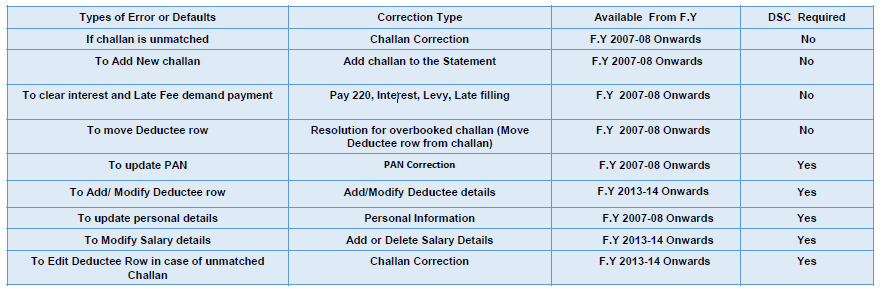 How to Add Delete salary TDS details: Online correction of Salary TDS Return[/caption]
This feature is extremely useful as it is :
Free of Cost : TRACES does not charge any fee for doing online correction
Time saving: No need to request for Conso file and wait for file availability. Just raise a request and you can select the type of correction you wish to proceed with. Correction gets processed in 24hrs
Effort saving: No need of any software/ CD/PEN drive , just login and file the correction
Enhance efficiency: Error specific correction is possible
Note: For paper return online correction cannot be done
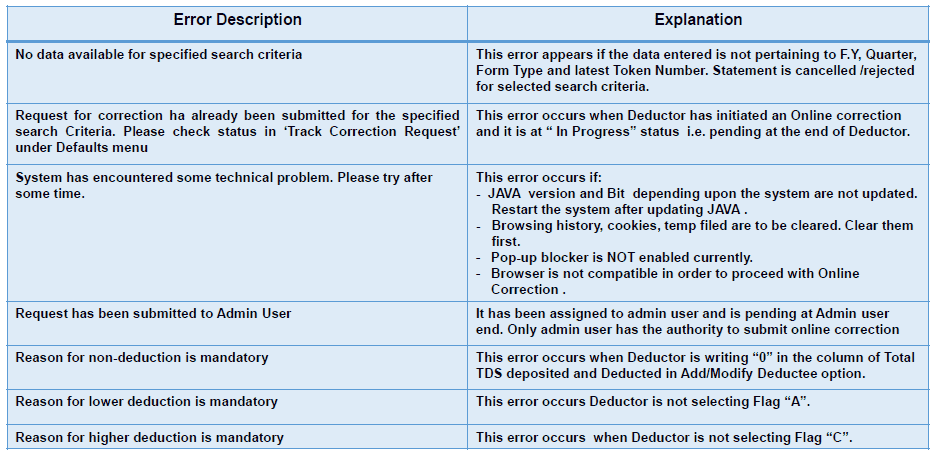
2.Most Common Error While filing Online Correction
How to Add Delete salary TDS details: Online correction of Salary TDS Return[/caption]
This feature is extremely useful as it is :
Free of Cost : TRACES does not charge any fee for doing online correction
Time saving: No need to request for Conso file and wait for file availability. Just raise a request and you can select the type of correction you wish to proceed with. Correction gets processed in 24hrs
Effort saving: No need of any software/ CD/PEN drive , just login and file the correction
Enhance efficiency: Error specific correction is possible
Note: For paper return online correction cannot be done
2.Most Common Error While filing Online Correction
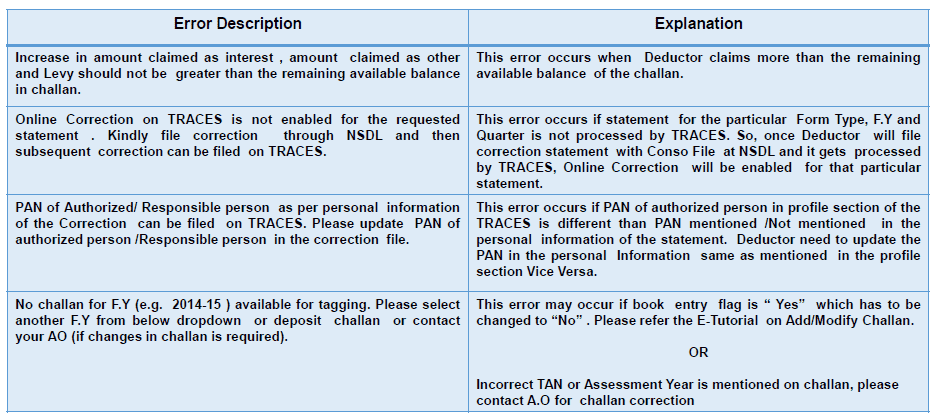
 2.1 Most Common Error While filing Online Correction (Contd.)
 3.Brief Steps for Online Correction - Add/Delete Salary Details-Annexure-II
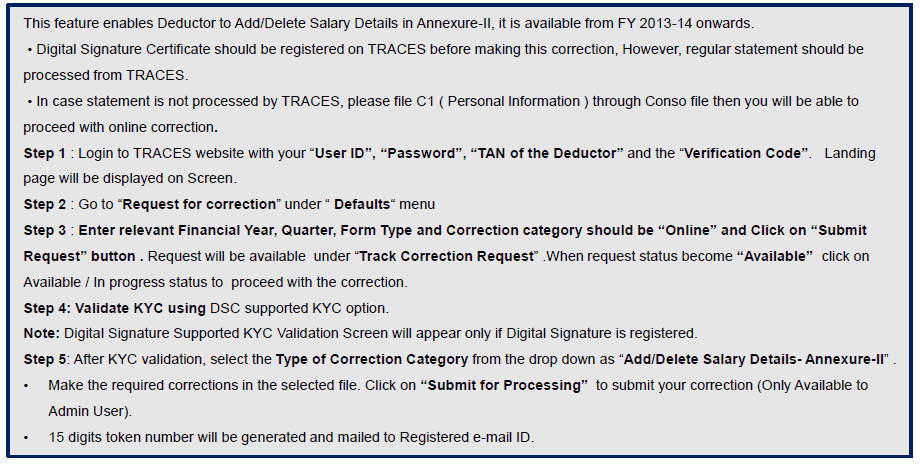 4. Status of Online Correction Requests
[caption id="attachment_88628" align="aligncenter" width="916"]
4. Status of Online Correction Requests
[caption id="attachment_88628" align="aligncenter" width="916"]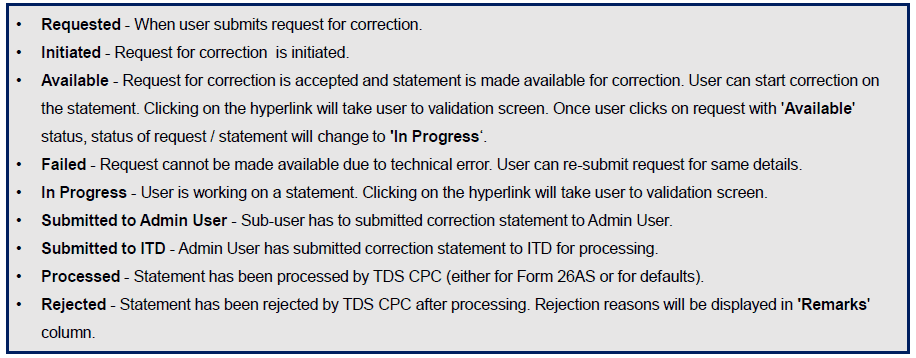 How to Add Delete salary TDS details: Online correction of Salary TDS Return[/caption]
5. Pictorial guide for Online Correction - Add/Delete Salary Details-Annexure-II
Step 1 : Login to TRACES website with your “User ID”, “Password”, “TAN of the Deductor” and the “Verification Code”
How to Add Delete salary TDS details: Online correction of Salary TDS Return[/caption]
5. Pictorial guide for Online Correction - Add/Delete Salary Details-Annexure-II
Step 1 : Login to TRACES website with your “User ID”, “Password”, “TAN of the Deductor” and the “Verification Code”
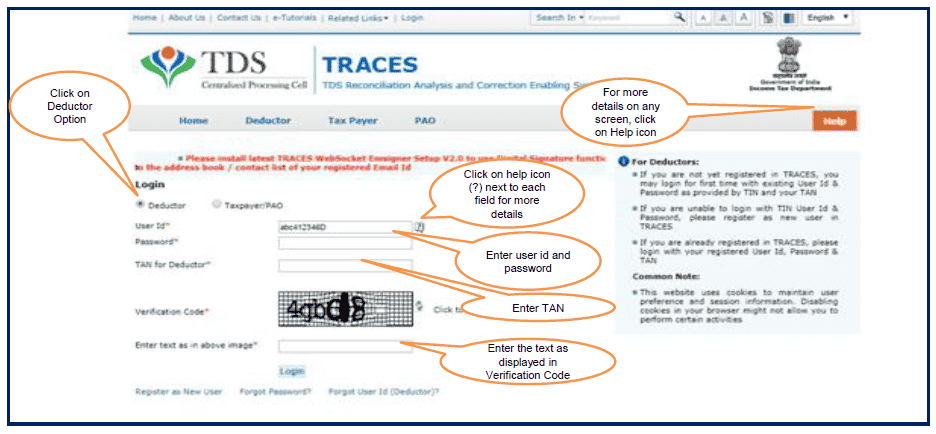 5.1 Pictorial guide for Online Correction - Add/Delete Salary Details-Annexure-II
Welcome Page
5.1 Pictorial guide for Online Correction - Add/Delete Salary Details-Annexure-II
Welcome Page
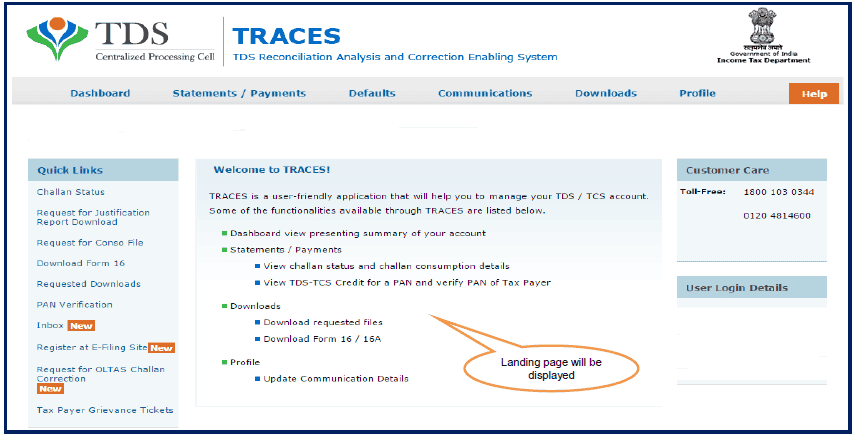 5.2 Pictorial guide for Online Correction - Add/Delete Salary Details-Annexure-II
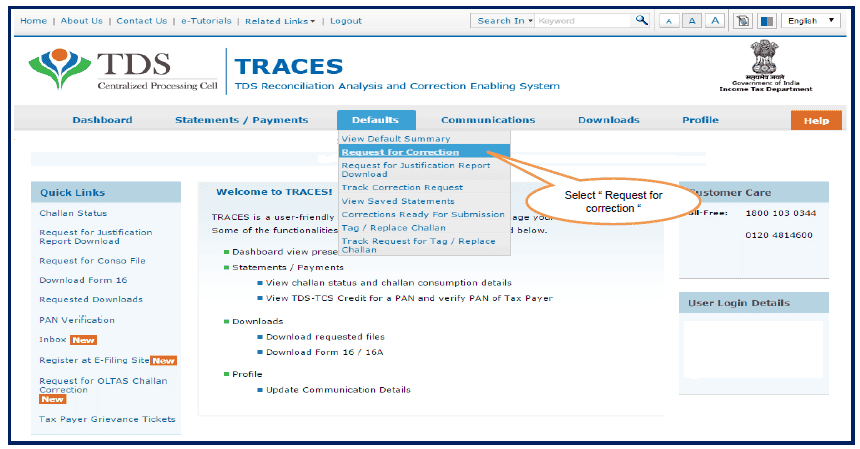
Step 2 : Click on “Request for correction” under “ Defaults“ Tab
5.2 Pictorial guide for Online Correction - Add/Delete Salary Details-Annexure-II
Step 2 : Click on “Request for correction” under “ Defaults“ Tab
 5.3 Pictorial guide for Online Correction - Add/Delete Salary Details-Annexure-II
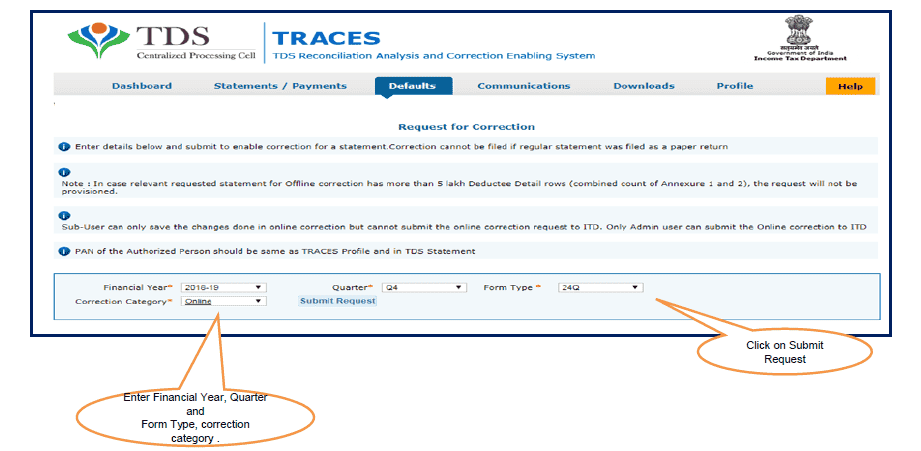
Step 3 : Enter relevant Financial Year, Quarter, Form Type and Correction category should be “Online” and Click on “Submit Request” button
5.3 Pictorial guide for Online Correction - Add/Delete Salary Details-Annexure-II
Step 3 : Enter relevant Financial Year, Quarter, Form Type and Correction category should be “Online” and Click on “Submit Request” button
 5.4 Pictorial guide for Online Correction - Add/Delete Salary Details-Annexure-II
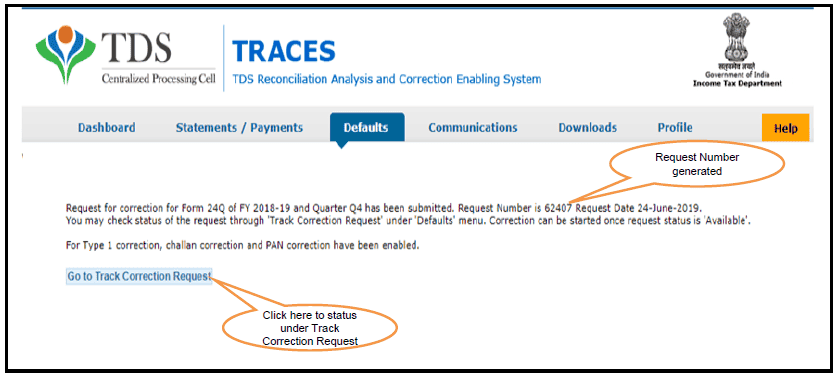
Step 3(Contd.): Request Number will be generated
5.4 Pictorial guide for Online Correction - Add/Delete Salary Details-Annexure-II
Step 3(Contd.): Request Number will be generated
 5.5 Pictorial guide for Online Correction - Add/Delete Salary Details-Annexure-II
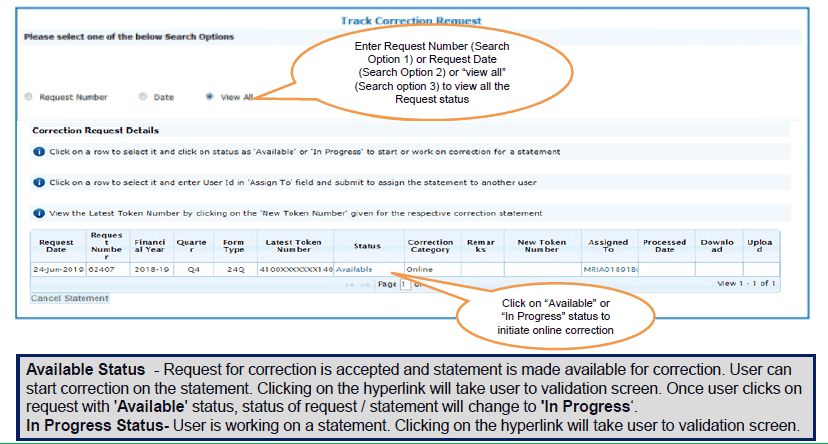
Step 3(Contd.): Request will be available under “Track Correction Request”
5.5 Pictorial guide for Online Correction - Add/Delete Salary Details-Annexure-II
Step 3(Contd.): Request will be available under “Track Correction Request”
 5.4 Pictorial guide for Online Correction - Add/Delete Salary Details-Annexure-II
Step 4: Validate KYC using DSC supported KYC option.
5.4 Pictorial guide for Online Correction - Add/Delete Salary Details-Annexure-II
Step 4: Validate KYC using DSC supported KYC option.
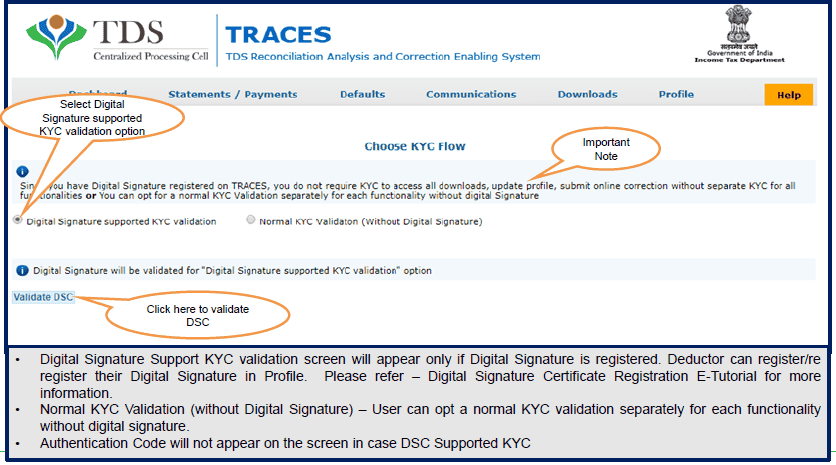 5.5 Pictorial guide for Online Correction - Add/Delete Salary Details- Annexure-II
Step 4 (Contd.): Validate KYC using DSC supported KYC option
5.5 Pictorial guide for Online Correction - Add/Delete Salary Details- Annexure-II
Step 4 (Contd.): Validate KYC using DSC supported KYC option
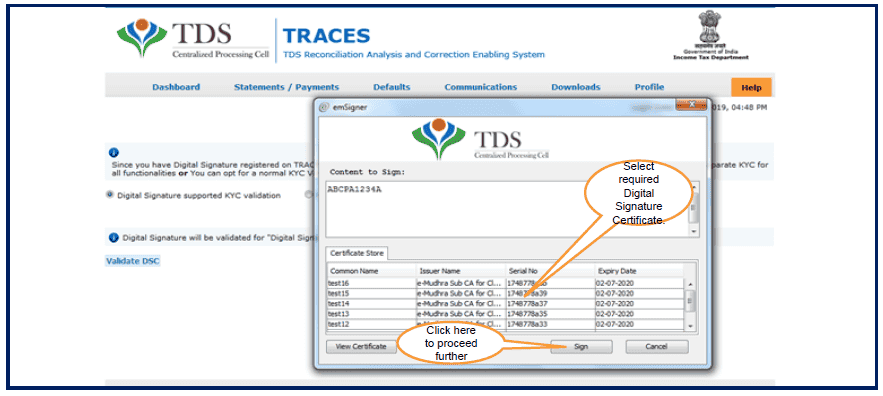 5.6 Pictorial guide for Online Correction - Add/Delete Salary Details Annexure-II
Step 5: After KYC validation, select the Type of Correction Category from the drop down as “Add/Delete Salary Details- Annexure-II”
5.6 Pictorial guide for Online Correction - Add/Delete Salary Details Annexure-II
Step 5: After KYC validation, select the Type of Correction Category from the drop down as “Add/Delete Salary Details- Annexure-II”
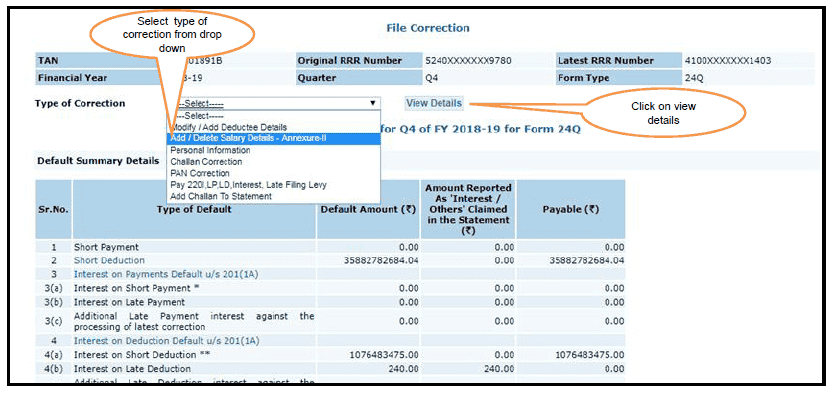 5.7 Pictorial guide for Online Correction - Add/delete Salary Details- Annexure-II
Add /Delete Salary Detail – Annexure II : Default Deductee
5.7 Pictorial guide for Online Correction - Add/delete Salary Details- Annexure-II
Add /Delete Salary Detail – Annexure II : Default Deductee
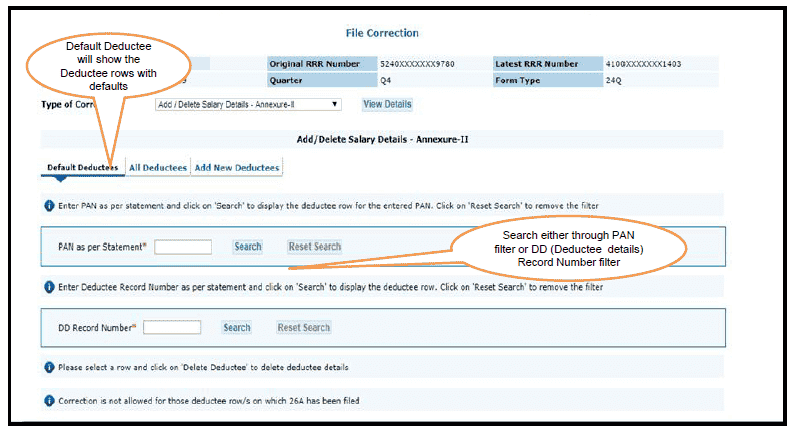 5.8 Pictorial guide for Online Correction - Add/delete Salary Details- Annexure-II
Add /Delete Salary Detail – Annexure II : Default Deductee
5.8 Pictorial guide for Online Correction - Add/delete Salary Details- Annexure-II
Add /Delete Salary Detail – Annexure II : Default Deductee
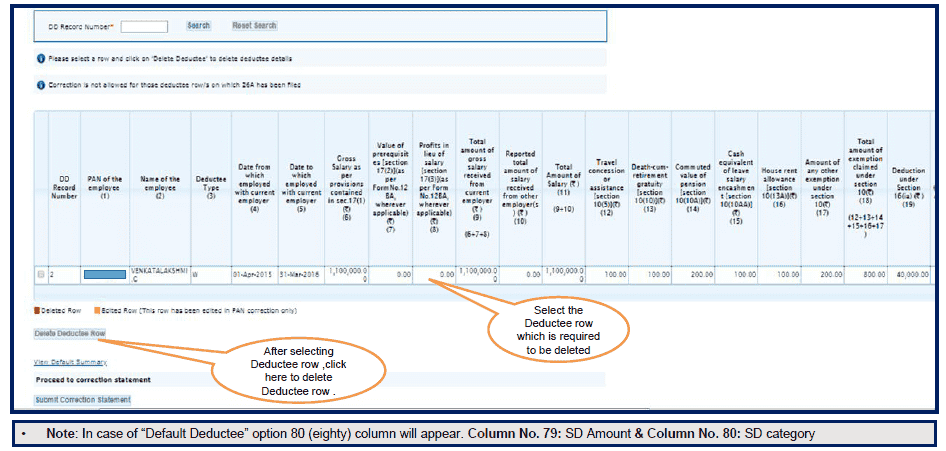 5.9 Pictorial guide for Online Correction - Add/Delete Salary Details- Annexure-II
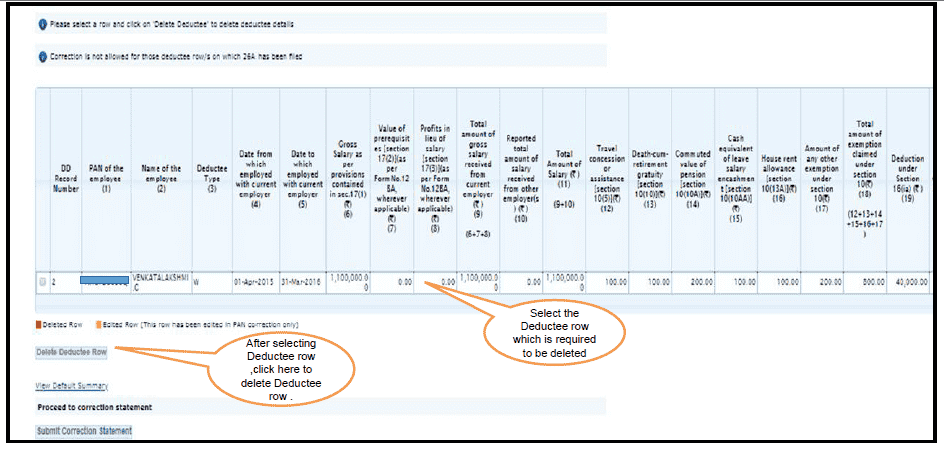
Add /Delete Salary Detail – Annexure II : Default Deductee:- After clicking on “Delete Deductee Row” button a Confirmation pop-up will be displayed on screen
5.9 Pictorial guide for Online Correction - Add/Delete Salary Details- Annexure-II
Add /Delete Salary Detail – Annexure II : Default Deductee:- After clicking on “Delete Deductee Row” button a Confirmation pop-up will be displayed on screen
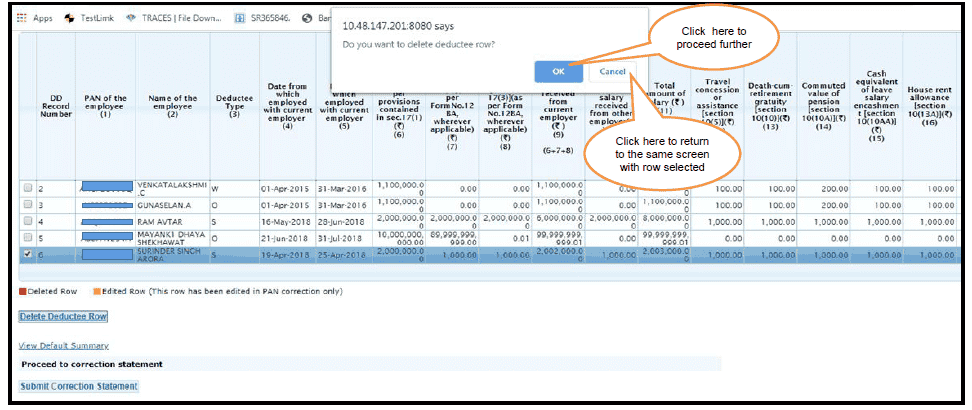 5.10 Pictorial guide for Online Correction - Add/Delete Salary Details- Annexure-II
Add /Delete Salary Detail – Annexure II : Default Deductee
5.10 Pictorial guide for Online Correction - Add/Delete Salary Details- Annexure-II
Add /Delete Salary Detail – Annexure II : Default Deductee
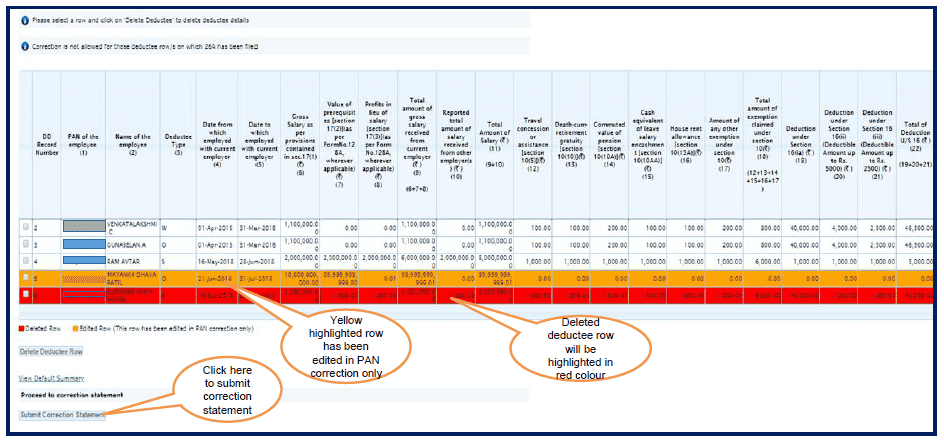 5.11 Pictorial guide for Online Correction - Add/Delete Salary Details- Annexure-II
Add /Delete Salary Detail – Annexure II : All Deductee
5.11 Pictorial guide for Online Correction - Add/Delete Salary Details- Annexure-II
Add /Delete Salary Detail – Annexure II : All Deductee
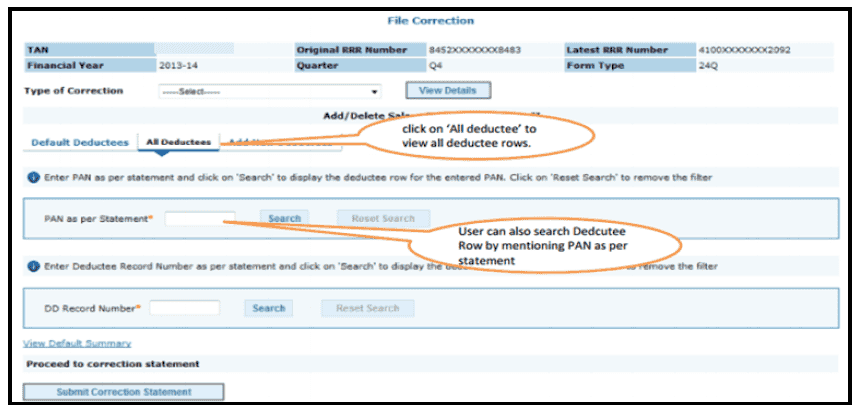 5.12 Pictorial guide for Online Correction - Add/Delete Salary Details- Annexure-II
Add /Delete Salary Detail – Annexure II : All Deductee:- Deductee rows will appear on the screen
5.12 Pictorial guide for Online Correction - Add/Delete Salary Details- Annexure-II
Add /Delete Salary Detail – Annexure II : All Deductee:- Deductee rows will appear on the screen
 5.13 Pictorial guide for Online Correction - Add/Delete Salary Details- Annexure-II
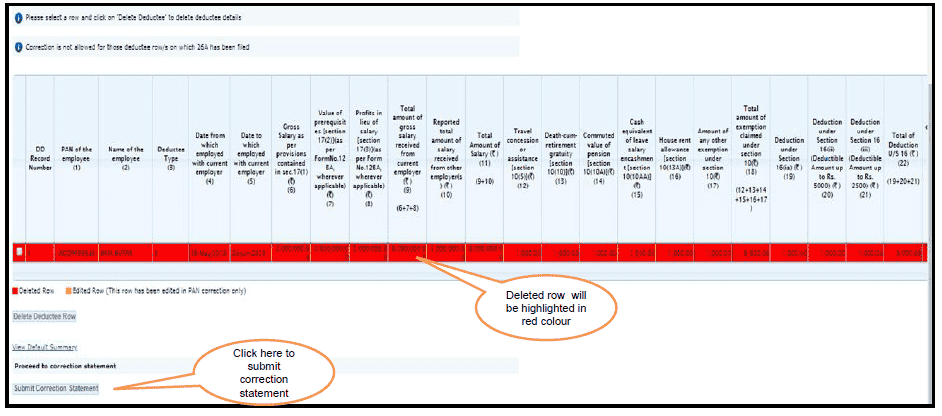
Add /Delete Salary Detail – Annexure II : All Deductee
5.13 Pictorial guide for Online Correction - Add/Delete Salary Details- Annexure-II
Add /Delete Salary Detail – Annexure II : All Deductee
 5.14 Pictorial guide for Online Correction - Add/Delete Salary Details- Annexure-II
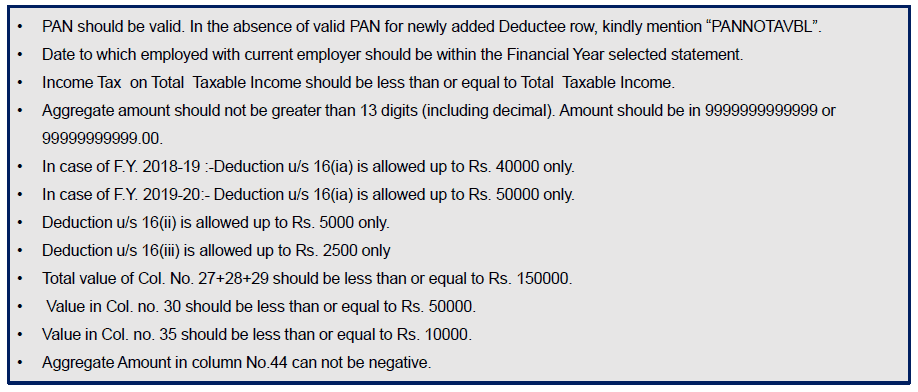
Important Information on Add /Delete Salary Detail – Annexure II : Add New Deductees
5.14 Pictorial guide for Online Correction - Add/Delete Salary Details- Annexure-II
Important Information on Add /Delete Salary Detail – Annexure II : Add New Deductees
 5.15 Pictorial guide for Online Correction - Add/Delete Salary Details- Annexure-II
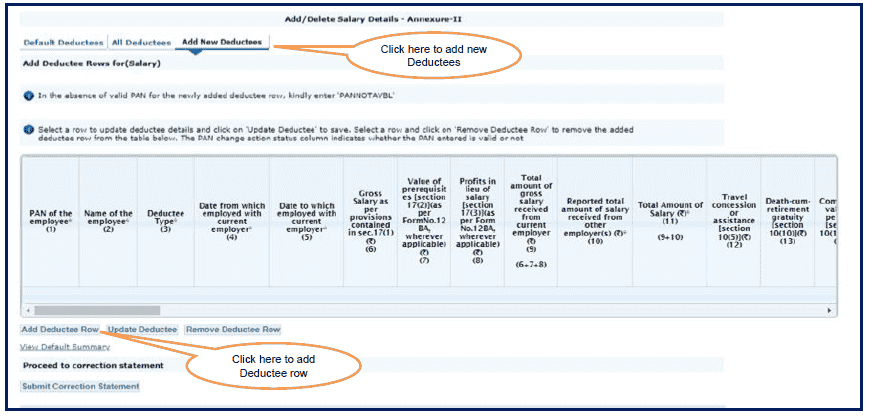
Add /Delete Salary Detail – Annexure II : Add New Deductees
5.15 Pictorial guide for Online Correction - Add/Delete Salary Details- Annexure-II
Add /Delete Salary Detail – Annexure II : Add New Deductees
 5.16 Pictorial guide for Online Correction - Add/Delete Salary Details- Annexure-II
Add /Delete Salary Detail – Annexure II : Add New Deductees
5.16 Pictorial guide for Online Correction - Add/Delete Salary Details- Annexure-II
Add /Delete Salary Detail – Annexure II : Add New Deductees
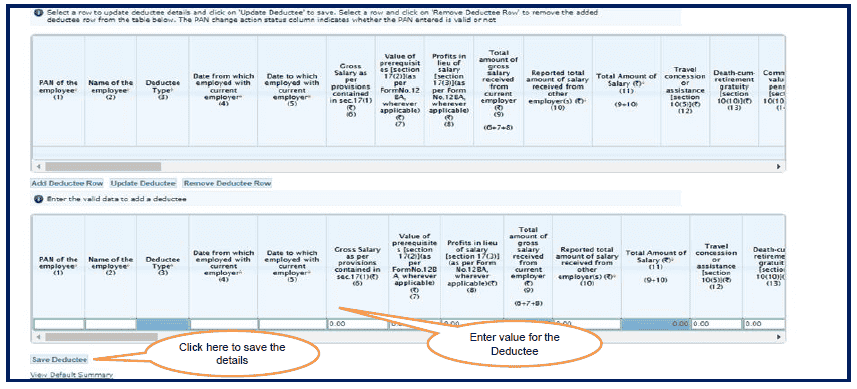 5.17 Pictorial guide for Online Correction - Add/Delete Salary Details- Annexure-II
Add /Delete Salary Detail – Annexure II : Add New Deductees
5.17 Pictorial guide for Online Correction - Add/Delete Salary Details- Annexure-II
Add /Delete Salary Detail – Annexure II : Add New Deductees
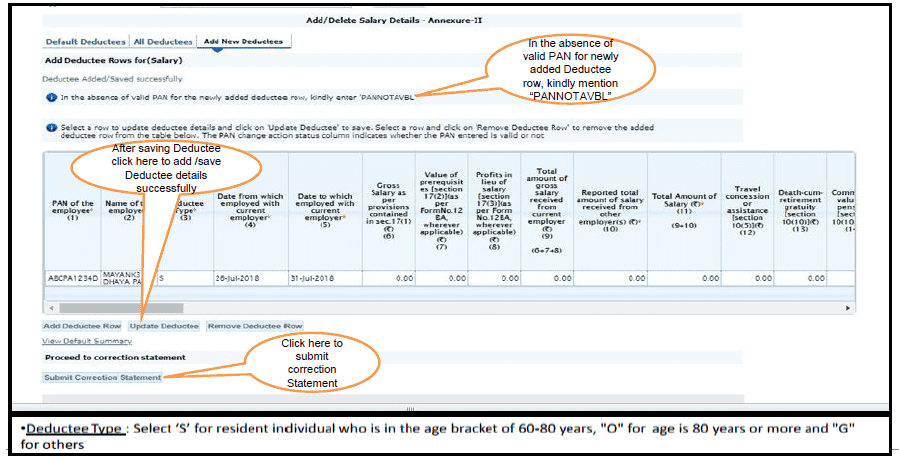 5.18 Pictorial guide for Online Correction - Add/Delete Salary Details- Annexure-II
Add /Delete Salary Detail – Annexure II : Newly introduced columns from F.Y 2018-19 (contd..)
5.18 Pictorial guide for Online Correction - Add/Delete Salary Details- Annexure-II
Add /Delete Salary Detail – Annexure II : Newly introduced columns from F.Y 2018-19 (contd..)
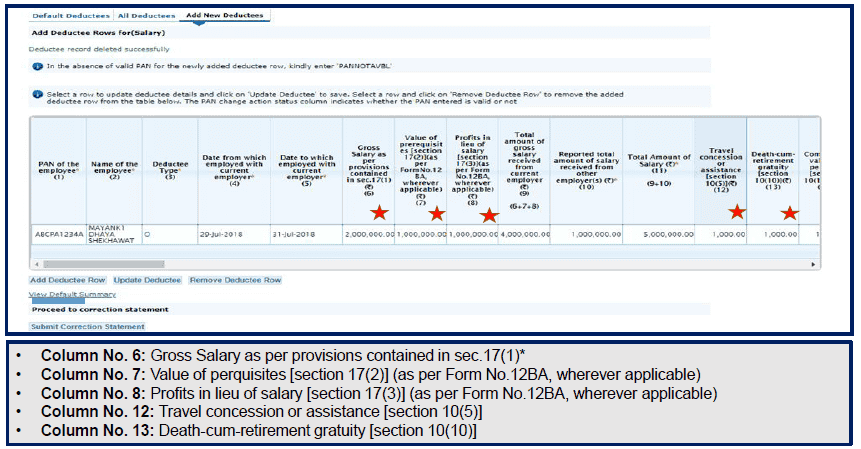 5.19 Pictorial guide for Online Correction - Add/Delete Salary Details- Annexure-II
Add /Delete Salary Detail – Annexure II : Newly introduced columns from F.Y 2018-19 (contd..)
5.19 Pictorial guide for Online Correction - Add/Delete Salary Details- Annexure-II
Add /Delete Salary Detail – Annexure II : Newly introduced columns from F.Y 2018-19 (contd..)
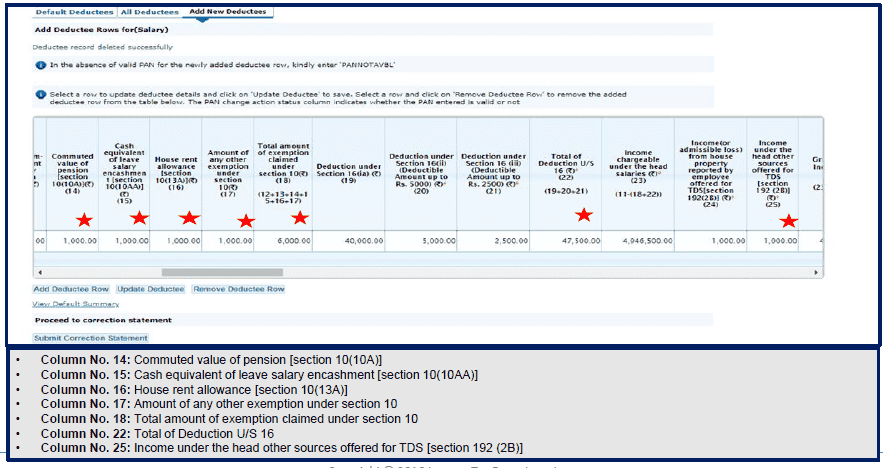 5.20 Pictorial guide for Online Correction - Add/Delete Salary Details- Annexure-II
Add /Delete Salary Detail – Annexure II : Newly introduced columns from F.Y 2018-19 (contd..)
5.20 Pictorial guide for Online Correction - Add/Delete Salary Details- Annexure-II
Add /Delete Salary Detail – Annexure II : Newly introduced columns from F.Y 2018-19 (contd..)
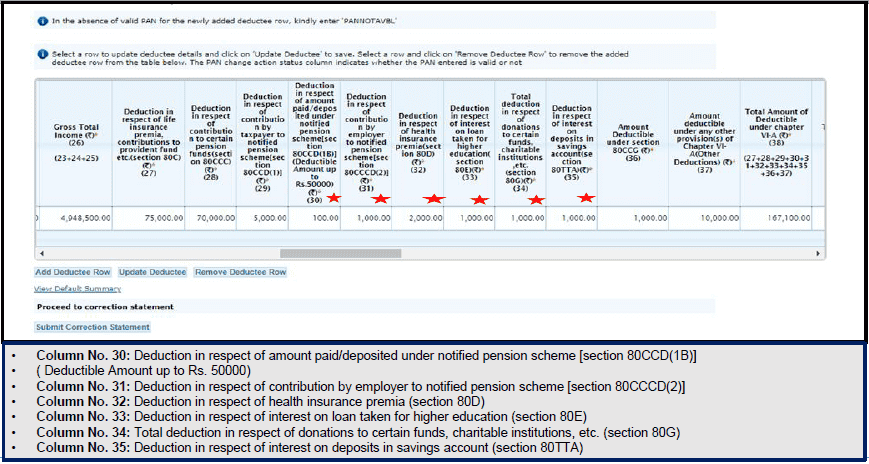 5.21 Pictorial guide for Online Correction - Add/Delete Salary Details- Annexure-II
Add /Delete Salary Detail – Annexure II : Newly introduced columns from F.Y 2018-19 (contd..)
5.21 Pictorial guide for Online Correction - Add/Delete Salary Details- Annexure-II
Add /Delete Salary Detail – Annexure II : Newly introduced columns from F.Y 2018-19 (contd..)
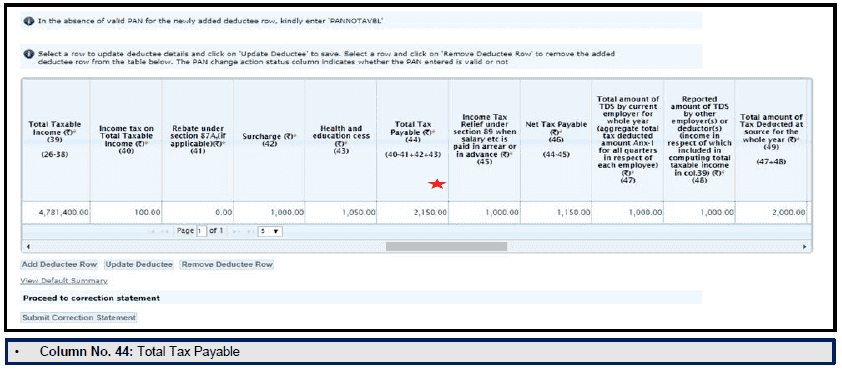 5.22 Pictorial guide for Online Correction - Add/Delete Salary Details- Annexure-II
Add /Delete Salary Detail – Annexure II : Newly introduced columns from F.Y 2018-19 (contd..)
5.22 Pictorial guide for Online Correction - Add/Delete Salary Details- Annexure-II
Add /Delete Salary Detail – Annexure II : Newly introduced columns from F.Y 2018-19 (contd..)
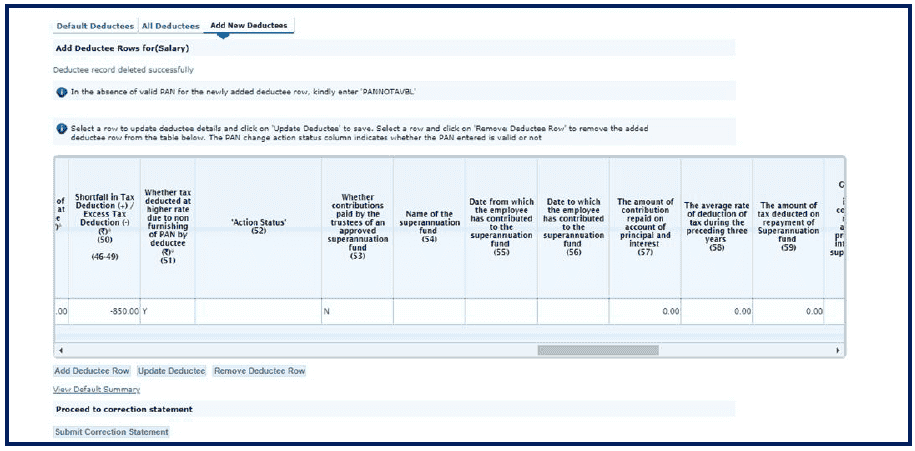 5.23 Pictorial guide for Online Correction - Add/Delete Salary Details- Annexure-II
Add /Delete Salary Detail – Annexure II : Add New Deductees (contd..)
5.23 Pictorial guide for Online Correction - Add/Delete Salary Details- Annexure-II
Add /Delete Salary Detail – Annexure II : Add New Deductees (contd..)
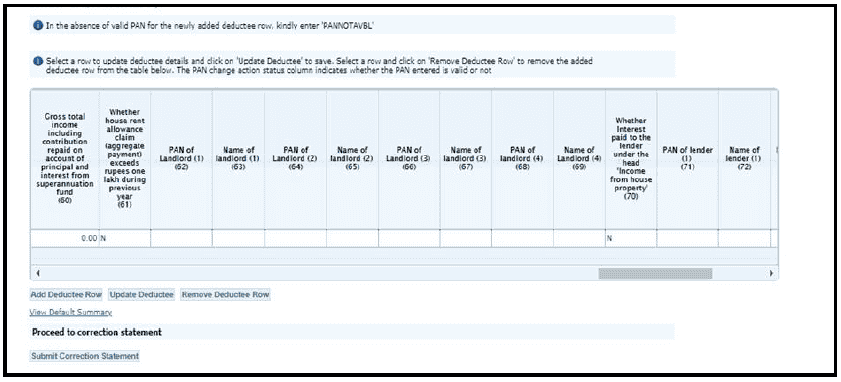 5.24 Pictorial guide for Online Correction - Add/Delete Salary Details- Annexure-II
Add /Delete Salary Detail – Annexure II : Add New Deductees (contd..)
5.24 Pictorial guide for Online Correction - Add/Delete Salary Details- Annexure-II
Add /Delete Salary Detail – Annexure II : Add New Deductees (contd..)
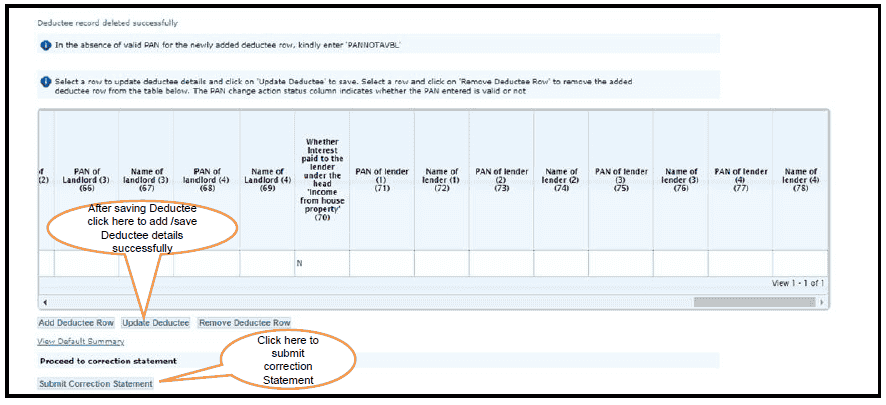 5.25 Pictorial guide for Online Correction - Add/Delete Salary Details- Annexure-II
After submitting correction below message will display on screen
5.25 Pictorial guide for Online Correction - Add/Delete Salary Details- Annexure-II
After submitting correction below message will display on screen
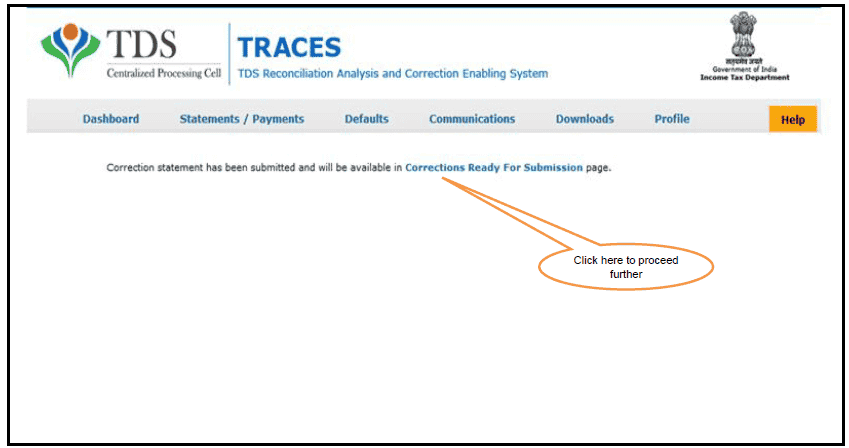 5.26 Pictorial guide for Online Correction - Add/Delete Salary Details- Annexure-II
Select a row and click on „View Statement‟ button to view Action Summary
5.26 Pictorial guide for Online Correction - Add/Delete Salary Details- Annexure-II
Select a row and click on „View Statement‟ button to view Action Summary
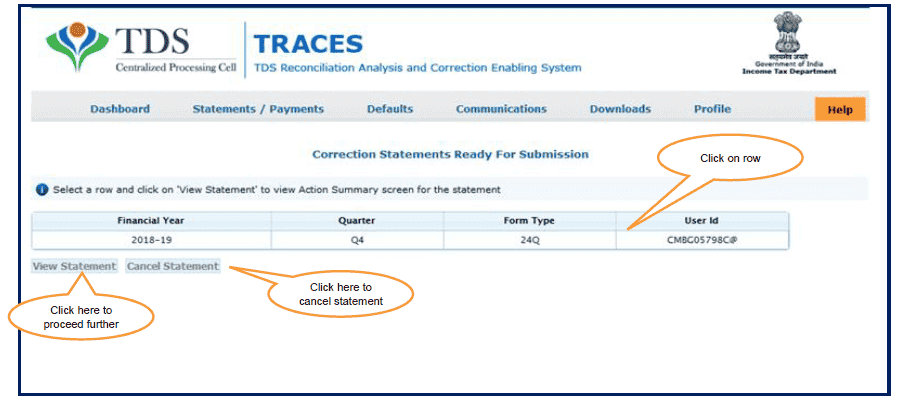 5.27 Pictorial guide for Online Correction - Add/Delete Salary Details- Annexure-II
Action Summary- Sub-User log in
5.27 Pictorial guide for Online Correction - Add/Delete Salary Details- Annexure-II
Action Summary- Sub-User log in
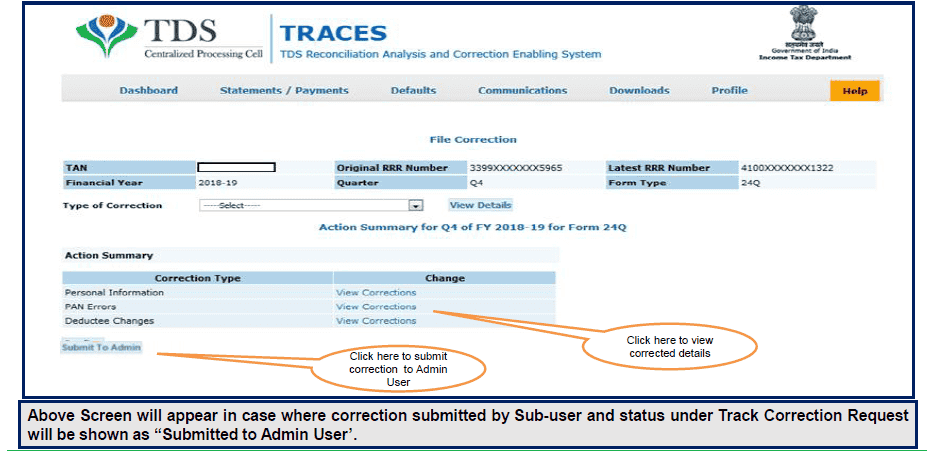 5.28 Pictorial guide for Online Correction - Add/Delete Salary Details- Annexure-II
Action Summary - Admin-User log in
5.28 Pictorial guide for Online Correction - Add/Delete Salary Details- Annexure-II
Action Summary - Admin-User log in
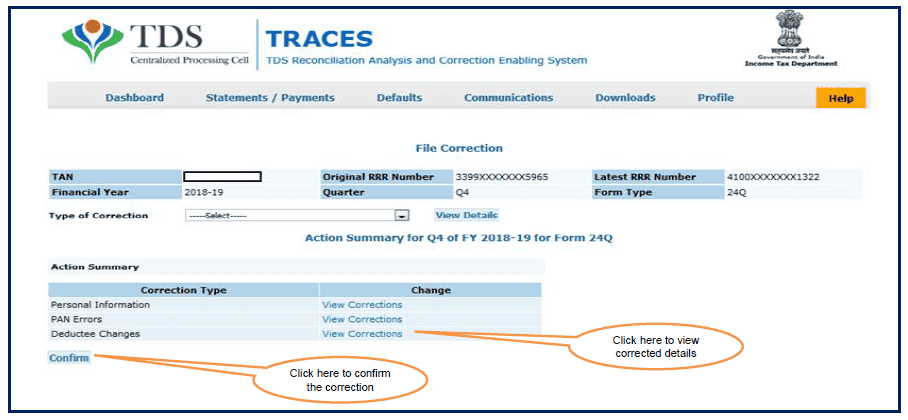 5.29 Pictorial guide for Online Correction - Add/Delete Salary Details- Annexure-II
After confirmation of correction click on “Submit for Processing” button
5.29 Pictorial guide for Online Correction - Add/Delete Salary Details- Annexure-II
After confirmation of correction click on “Submit for Processing” button
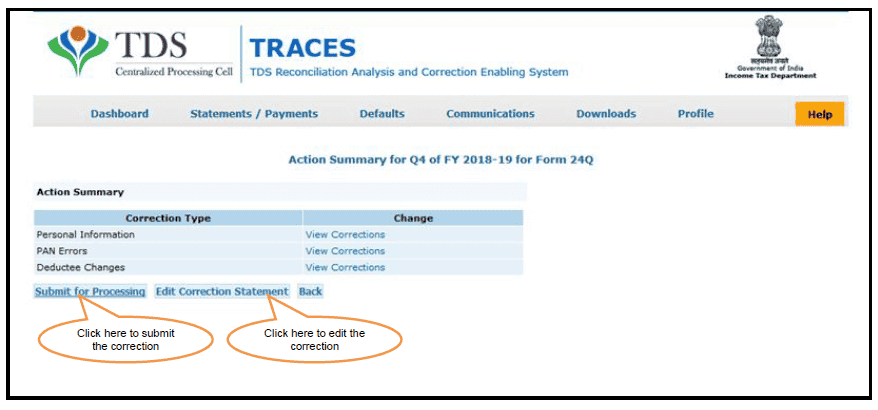 5.30 Pictorial guide for Online Correction - Add/Delete Salary Details- Annexure-II
Web signer window will be displayed to validate the DSC
5.30 Pictorial guide for Online Correction - Add/Delete Salary Details- Annexure-II
Web signer window will be displayed to validate the DSC
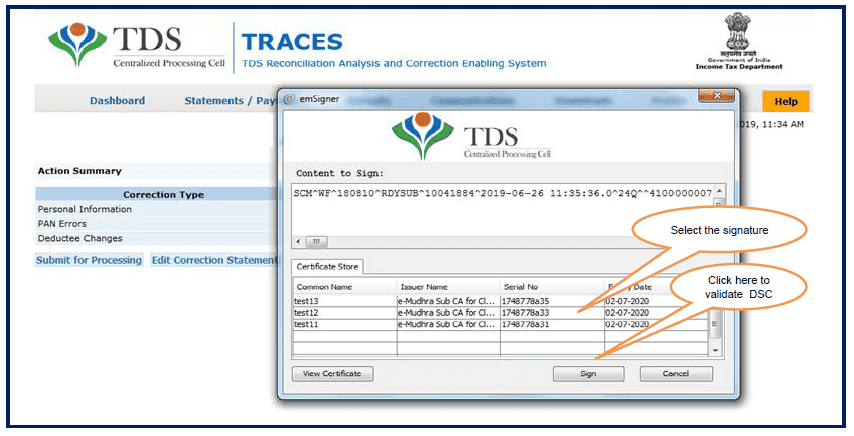 5.31 Pictorial guide for Online Correction - Add/Delete Salary Details- Annexure-II
“Correction statement submitted successfully” message will appear on the screen after final submission correction
5.31 Pictorial guide for Online Correction - Add/Delete Salary Details- Annexure-II
“Correction statement submitted successfully” message will appear on the screen after final submission correction
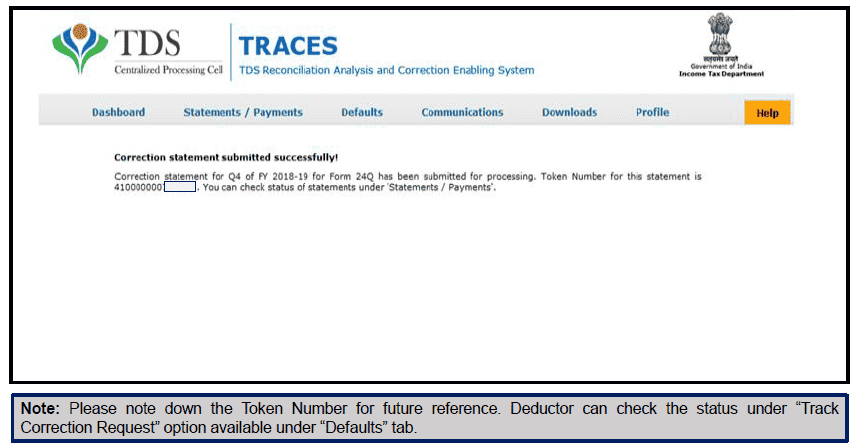 Download E-Tutorial PDF
Tags: Income Tax, TDS
Download E-Tutorial PDF
Tags: Income Tax, TDS
How to Add Delete salary TDS details: Online correction of Salary TDS Return[/caption]
This feature is extremely useful as it is :
Free of Cost : TRACES does not charge any fee for doing online correction
Time saving: No need to request for Conso file and wait for file availability. Just raise a request and you can select the type of correction you wish to proceed with. Correction gets processed in 24hrs
Effort saving: No need of any software/ CD/PEN drive , just login and file the correction
Enhance efficiency: Error specific correction is possible
Note: For paper return online correction cannot be done
2.Most Common Error While filing Online Correction
2.1 Most Common Error While filing Online Correction (Contd.)
3.Brief Steps for Online Correction - Add/Delete Salary Details-Annexure-II
4. Status of Online Correction Requests
[caption id="attachment_88628" align="aligncenter" width="916"] How to Add Delete salary TDS details: Online correction of Salary TDS Return[/caption]
5. Pictorial guide for Online Correction - Add/Delete Salary Details-Annexure-II
Step 1 : Login to TRACES website with your “User ID”, “Password”, “TAN of the Deductor” and the “Verification Code”
5.1 Pictorial guide for Online Correction - Add/Delete Salary Details-Annexure-II
Welcome Page
5.2 Pictorial guide for Online Correction - Add/Delete Salary Details-Annexure-II
Step 2 : Click on “Request for correction” under “ Defaults“ Tab
5.3 Pictorial guide for Online Correction - Add/Delete Salary Details-Annexure-II
Step 3 : Enter relevant Financial Year, Quarter, Form Type and Correction category should be “Online” and Click on “Submit Request” button
5.4 Pictorial guide for Online Correction - Add/Delete Salary Details-Annexure-II
Step 3(Contd.): Request Number will be generated
5.5 Pictorial guide for Online Correction - Add/Delete Salary Details-Annexure-II
Step 3(Contd.): Request will be available under “Track Correction Request”
5.4 Pictorial guide for Online Correction - Add/Delete Salary Details-Annexure-II
Step 4: Validate KYC using DSC supported KYC option.
5.5 Pictorial guide for Online Correction - Add/Delete Salary Details- Annexure-II
Step 4 (Contd.): Validate KYC using DSC supported KYC option
5.6 Pictorial guide for Online Correction - Add/Delete Salary Details Annexure-II
Step 5: After KYC validation, select the Type of Correction Category from the drop down as “Add/Delete Salary Details- Annexure-II”
5.7 Pictorial guide for Online Correction - Add/delete Salary Details- Annexure-II
Add /Delete Salary Detail – Annexure II : Default Deductee
5.8 Pictorial guide for Online Correction - Add/delete Salary Details- Annexure-II
Add /Delete Salary Detail – Annexure II : Default Deductee
5.9 Pictorial guide for Online Correction - Add/Delete Salary Details- Annexure-II
Add /Delete Salary Detail – Annexure II : Default Deductee:- After clicking on “Delete Deductee Row” button a Confirmation pop-up will be displayed on screen
5.10 Pictorial guide for Online Correction - Add/Delete Salary Details- Annexure-II
Add /Delete Salary Detail – Annexure II : Default Deductee
5.11 Pictorial guide for Online Correction - Add/Delete Salary Details- Annexure-II
Add /Delete Salary Detail – Annexure II : All Deductee
5.12 Pictorial guide for Online Correction - Add/Delete Salary Details- Annexure-II
Add /Delete Salary Detail – Annexure II : All Deductee:- Deductee rows will appear on the screen
5.13 Pictorial guide for Online Correction - Add/Delete Salary Details- Annexure-II
Add /Delete Salary Detail – Annexure II : All Deductee
5.14 Pictorial guide for Online Correction - Add/Delete Salary Details- Annexure-II
Important Information on Add /Delete Salary Detail – Annexure II : Add New Deductees
5.15 Pictorial guide for Online Correction - Add/Delete Salary Details- Annexure-II
Add /Delete Salary Detail – Annexure II : Add New Deductees
5.16 Pictorial guide for Online Correction - Add/Delete Salary Details- Annexure-II
Add /Delete Salary Detail – Annexure II : Add New Deductees
5.17 Pictorial guide for Online Correction - Add/Delete Salary Details- Annexure-II
Add /Delete Salary Detail – Annexure II : Add New Deductees
5.18 Pictorial guide for Online Correction - Add/Delete Salary Details- Annexure-II
Add /Delete Salary Detail – Annexure II : Newly introduced columns from F.Y 2018-19 (contd..)
5.19 Pictorial guide for Online Correction - Add/Delete Salary Details- Annexure-II
Add /Delete Salary Detail – Annexure II : Newly introduced columns from F.Y 2018-19 (contd..)
5.20 Pictorial guide for Online Correction - Add/Delete Salary Details- Annexure-II
Add /Delete Salary Detail – Annexure II : Newly introduced columns from F.Y 2018-19 (contd..)
5.21 Pictorial guide for Online Correction - Add/Delete Salary Details- Annexure-II
Add /Delete Salary Detail – Annexure II : Newly introduced columns from F.Y 2018-19 (contd..)
5.22 Pictorial guide for Online Correction - Add/Delete Salary Details- Annexure-II
Add /Delete Salary Detail – Annexure II : Newly introduced columns from F.Y 2018-19 (contd..)
5.23 Pictorial guide for Online Correction - Add/Delete Salary Details- Annexure-II
Add /Delete Salary Detail – Annexure II : Add New Deductees (contd..)
5.24 Pictorial guide for Online Correction - Add/Delete Salary Details- Annexure-II
Add /Delete Salary Detail – Annexure II : Add New Deductees (contd..)
5.25 Pictorial guide for Online Correction - Add/Delete Salary Details- Annexure-II
After submitting correction below message will display on screen
5.26 Pictorial guide for Online Correction - Add/Delete Salary Details- Annexure-II
Select a row and click on „View Statement‟ button to view Action Summary
5.27 Pictorial guide for Online Correction - Add/Delete Salary Details- Annexure-II
Action Summary- Sub-User log in
5.28 Pictorial guide for Online Correction - Add/Delete Salary Details- Annexure-II
Action Summary - Admin-User log in
5.29 Pictorial guide for Online Correction - Add/Delete Salary Details- Annexure-II
After confirmation of correction click on “Submit for Processing” button
5.30 Pictorial guide for Online Correction - Add/Delete Salary Details- Annexure-II
Web signer window will be displayed to validate the DSC
5.31 Pictorial guide for Online Correction - Add/Delete Salary Details- Annexure-II
“Correction statement submitted successfully” message will appear on the screen after final submission correction
Download E-Tutorial PDF
Tags: Income Tax, TDSAbout Author


Reetu
Content Manager
Reetu is a Content Writer with 4+ years of experience in GST, Income Tax, Finance, Company Law, Education and Career Related Content. She is a B.COM (Honrs.) Graduate.
Reetu is a Content Writer with 4+ years of experience in GST, Income Tax, Finance, Company Law, Education and Career Related Content. She is a B.COM (Honrs.) Graduate.
 Studycafe
 Delhi, Delhi, India
 8071
8071My Recent Articles
- Income Tax Guide for Indian Defence Personnel for Tax Filing, Taxable Allowances and Other Benefits
- Income Tax Return Breaking: ITR Forms released for AY 25-26
- Ex-DRT Officials Sentenced to 5 Years Rigorous Imprisonment by Madras High Court along with Rs.27 Lakh Fine
- GSTN issued Advisory on Case Sensitivity in IRN Generation
- RBI to issue Notes of Rs.10 and Rs.500 bearing Signature of Guv Malhotra
Up Next
Loading suggestions…


Recent Posts



All Posts



Tags
Recent Posts
All Posts