Advisory for ECCS User Registration on ICEGATE:
The Indian Customs National Trade Portal has released an Advisory on ECCS User Registration on ICEGATE.
ECCS User Registration on ICEGATE
 Reetu
Reetu Sep 23, 2024
Table of Contents

Advisory for ECCS User Registration on ICEGATE
The Indian Customs National Trade Portal has released an Advisory on ECCS User Registration on ICEGATE.
All Authorized Couriers registered in the Express Cargo Clearance System (ECCS) are now urged to register in the ICEGATE portal in order to use the Electronic Cash Ledger (ECL) feature. Existing ICEGATE users (those who have previously registered on ICEGATE1) are not affected.
The Advisory Read as Follows:
All Authorized Couriers registered in the Express Cargo Clearance System (ECCS) are now urged to register in the ICEGATE portal in order to use the Electronic Cash Ledger (ECL) feature.
Existing ICEGATE users (those who have previously registered on ICEGATE1.0) do not need to register again and may just log in to the new ICEGATE2.0 portal.
Further, in order to guide the stakeholders about the process of applying in the ICEGATE portal, this advisory is being issued.
Through this facility, authorized couriers in ECCS can submit the registration request on the ICEGATE Portal after providing the requisite details. After the approval by ECCS admin officers on the ICEGATE Portal and successful system validation, authorized couriers in ECCS shall receive ICEGATE credentials to access the ICEGATE website.

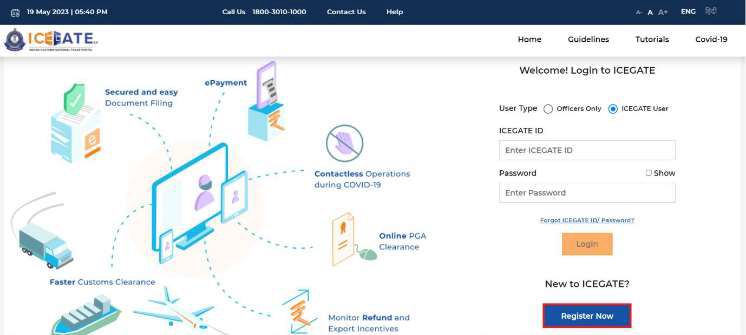
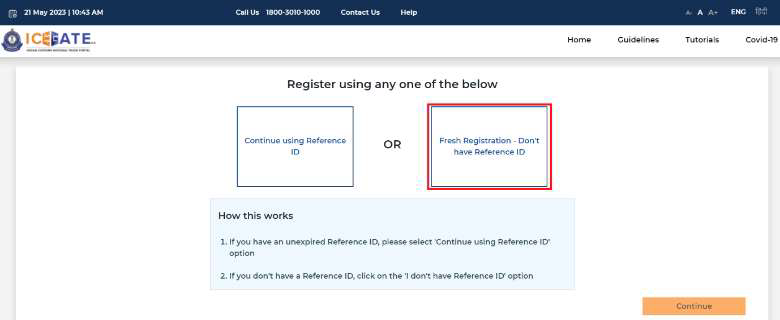
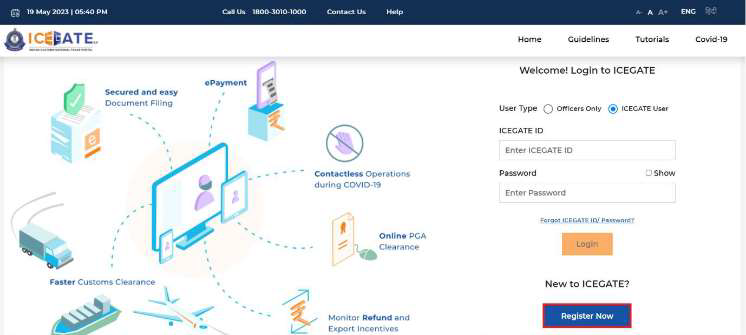 (b) For new registrations, click on the button as shown in the screen below highlighted in red box.
 (c) If the user is attempting the Registration for the first time and doesn’t have a Reference ID, the user will have to click on the 'Fresh Registration- Don't have Reference ID' option and click on the button.
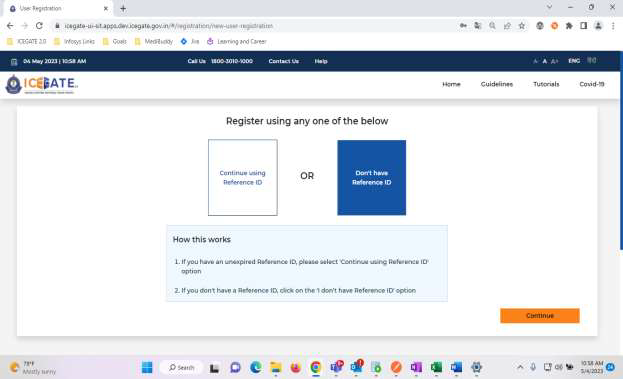 (d) If the user has an unexpired Reference ID, click on the 'Continue using Reference ID' option.
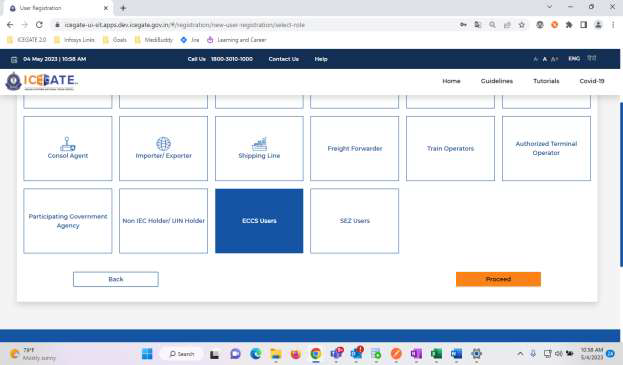
 (e) On clicking the button, the system will display the screen below from where the user will have to select a Role and click on the button. The user should select the role ‘ECCS users’ for ECCS Registration.
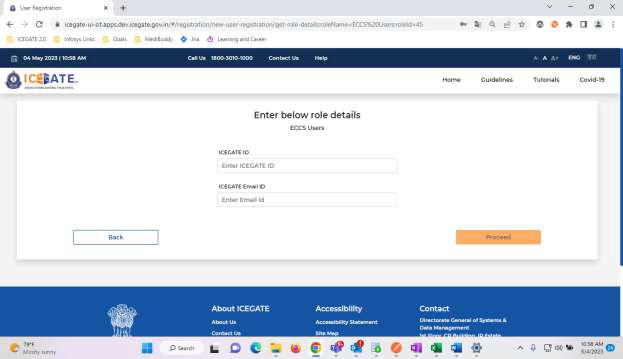
 (f) On clicking the button, the system will display the screen below where the user needs to enter the ICEGATE ID and Email ID. The ICEGATE ID is the username selected by the user and the email ID is the email to which the user has access.
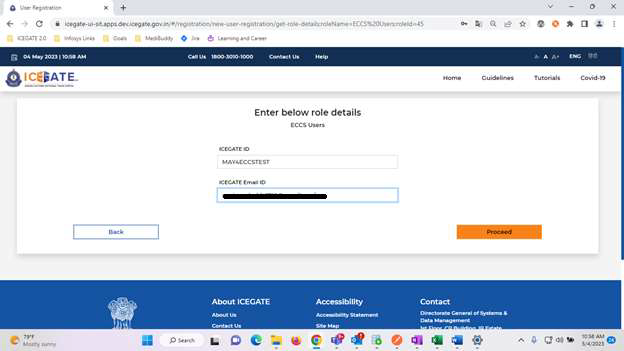
 (g) Please note that in order to proceed ahead:
 To Read More Download PDF Given Below:
A. How to Register/Sign Up as an ECCS User on ICEGATE
I. Required Documents/Information: a. The following documents are required to be submitted by the individual authorized on behalf of the registering entity while applying for registration on the ICEGATE User Registration Module:i. Self-attested scanned copy of Authorization Letter signed by:
-
- Proprietor in Proprietorship firm;
- All partners in a Partnership firm or LLP;
- In the case of corporate entity:
- Majority of the number of Directors/Designated Partners in the entity, as the case may be; or,
- Company Secretary clearly referring to and enclosing therewith a Board Resolution in this regard.
ii. Self-attested scanned copy of Courier License;
iii. Self–attested copy of Company PAN Card;
iv. Self-attested scanned Copy of any one of the following documents issued by a statutory authority or State/Central Government in India for the authorized individual:
- Driving License
- Passport
- Aadhaar Card (preferred)
- Voter ID card
B. Step-wise guide for Authorized Couriers to register on ICEGATE Portal
Please follow the below-mentioned steps for obtaining a new ECCS Registration on ICEGATE portal: (a) If the user has already registered earlier, the user can directly log in by providing their ICEGATE ID and Password without having to register again. In such cases, the ‘User Type’ that needs to be selected shall be ‘ICEGATE User’.
(b) For new registrations, click on the button as shown in the screen below highlighted in red box.
 (c) If the user is attempting the Registration for the first time and doesn’t have a Reference ID, the user will have to click on the 'Fresh Registration- Don't have Reference ID' option and click on the button.
(d) If the user has an unexpired Reference ID, click on the 'Continue using Reference ID' option.
(e) On clicking the button, the system will display the screen below from where the user will have to select a Role and click on the button. The user should select the role ‘ECCS users’ for ECCS Registration.
(f) On clicking the button, the system will display the screen below where the user needs to enter the ICEGATE ID and Email ID. The ICEGATE ID is the username selected by the user and the email ID is the email to which the user has access.
(g) Please note that in order to proceed ahead:
(c) If the user is attempting the Registration for the first time and doesn’t have a Reference ID, the user will have to click on the 'Fresh Registration- Don't have Reference ID' option and click on the button.
(d) If the user has an unexpired Reference ID, click on the 'Continue using Reference ID' option.
(e) On clicking the button, the system will display the screen below from where the user will have to select a Role and click on the button. The user should select the role ‘ECCS users’ for ECCS Registration.
(f) On clicking the button, the system will display the screen below where the user needs to enter the ICEGATE ID and Email ID. The ICEGATE ID is the username selected by the user and the email ID is the email to which the user has access.
(g) Please note that in order to proceed ahead:
- ICEGATE ID will be the unique username for ICEGATE Login.
- Email ID should be valid.
To Read More Download PDF Given Below:About Author


Reetu
Content Manager
Reetu is a Content Writer with 4+ years of experience in GST, Income Tax, Finance, Company Law, Education and Career Related Content. She is a B.COM (Honrs.) Graduate.
Reetu is a Content Writer with 4+ years of experience in GST, Income Tax, Finance, Company Law, Education and Career Related Content. She is a B.COM (Honrs.) Graduate.
 Studycafe
 Delhi, Delhi, India
 8071
8071My Recent Articles
- Income Tax Guide for Indian Defence Personnel for Tax Filing, Taxable Allowances and Other Benefits
- Income Tax Return Breaking: ITR Forms released for AY 25-26
- Ex-DRT Officials Sentenced to 5 Years Rigorous Imprisonment by Madras High Court along with Rs.27 Lakh Fine
- GSTN issued Advisory on Case Sensitivity in IRN Generation
- RBI to issue Notes of Rs.10 and Rs.500 bearing Signature of Guv Malhotra
Up Next
Loading suggestions…


Recent Posts


All Posts


Tags
No tags yet.
Recent Posts
All Posts
Tags
No tags yet.